Documentation / Getting Started

Your First VB Signal: Quick Start Guide

Last updated: January 1, 2025

Overview: From Login to Executed Trade

This guide walks you through finding and executing your first VB signal in under 5 minutes. We’ll use the Scanner to identify a high-conviction setup, verify it on the Symbol Page, and prepare the trade for execution in your broker. This step-by-step tutorial removes any confusion about how to translate signals into actual trades.

By the end of this tutorial, you’ll have a clear process for finding profitable trading opportunities every trading day. The workflow becomes muscle memory after just a few repetitions, allowing you to scan and execute trades efficiently. Most traders complete this process in 2-3 minutes once familiar with the platform.

Step 1: Login and Access the Dashboard (30 seconds)

After logging in, you’ll land on the Dashboard. Take a quick look at the key market metrics to understand current conditions. This 30-second overview helps you calibrate your expectations for the trading session:

  • Active Breaches: How many signals are currently available (typical range: 15-40)
  • Market Bias: Are we seeing more long or short signals today? If it’s 70% long signals, the market has bullish momentum
  • Top Conviction Trades: Quick preview of the highest-ranked signals

For example, if you see 28 Active Breaches with 18 LONG and 10 SHORT, and the Top Conviction card shows an AAPL LONG signal at 82 conviction, you know there are quality opportunities available. The bullish bias (18 vs 10) suggests upside momentum is dominating, which means LONG signals may have better follow-through today. This market context informs your filtering decisions in the Scanner.

Step 2: Navigate to the Scanner (10 seconds)

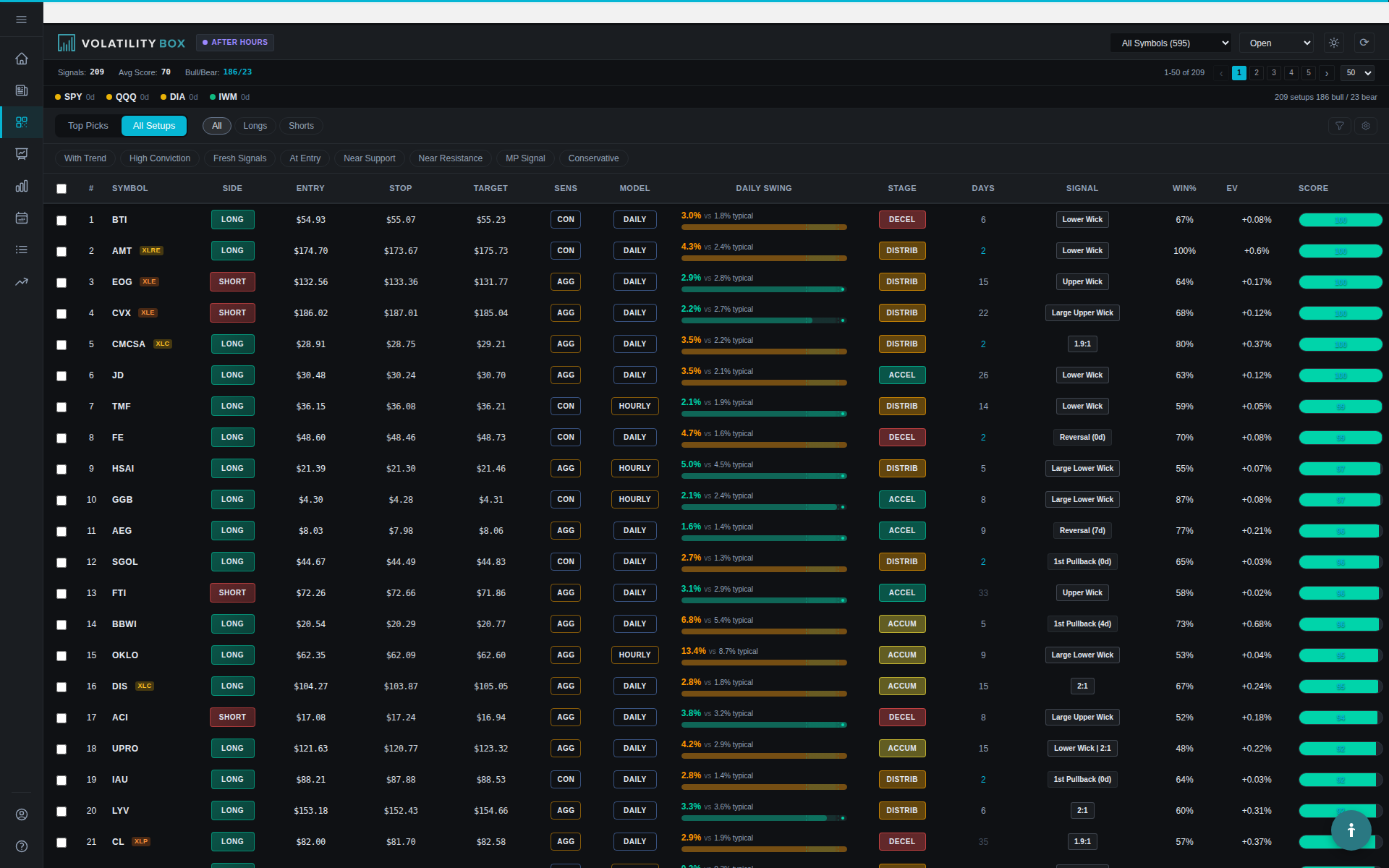
Click “Scanner” in the left sidebar. You’ll see a table with all active VB signals, showing comprehensive data for each setup. The Scanner consolidates everything you need to evaluate a trade in one view:

  • Symbol and Direction (LONG/SHORT)
  • Conviction Score (0-100)
  • Entry, Stop, and Target prices
  • Model Type (Hourly Aggressive, Hourly Conservative, Daily Aggressive, Daily Conservative)
  • Win Rate % and Expectancy from backtests
  • Market Pulse indicators
  • Current Status

Step 3: Filter for High-Conviction Signals (45 seconds)

For your first trade, we want high-quality setups to maximize your probability of success. Use these filters to narrow down the field to premium opportunities:

  1. Conviction Score: Move the slider to 80+ (this filters for signals with strong multi-factor confirmation)
  2. Win Rate: Set minimum to 50% (focus on historically successful setups)
  3. Status: Select “Open” only (active signals that haven’t hit target or stop yet)
  4. Direction: Choose “LONG” or “SHORT” based on your preference (start with LONG if you’re new)

After applying these filters, you should see 3-8 high-quality signals instead of the full list of 20-40. This focused list makes it easy to compare the best opportunities without getting overwhelmed. The filtering removes lower-quality setups that don’t meet your criteria, saving you time and reducing decision fatigue.

Step 4: Sort by Conviction and Review Top Signals (60 seconds)

Click the “Conviction” column header to sort from highest to lowest. This brings the best-ranked signals to the top of the list. Let’s say the top result is:

  • Symbol: MSFT LONG
  • Conviction: 84
  • Entry: $378.50
  • Stop: $376.20
  • Target: $380.80
  • Model: Hourly Aggressive
  • Win Rate: 58%
  • Expectancy: +$0.42
  • Market Pulse: FP (First Pullback), WITH trend, Green
  • Status: Open

Here’s what this tells you about the quality and characteristics of this setup: This is an important aspect of using the platform effectively. This information is valuable for understanding how to use the platform more effectively.

The Setup: MSFT broke above the VB upper band at $378.50, triggering a long signal. The stop is at $376.20 (the lower band), giving you $2.30 of risk. The target is $380.80, giving you $2.30 of potential reward – a 1:1 risk/reward ratio. This symmetrical risk-reward means you need approximately a 50% win rate to break even, and this signal’s 58% historical win rate gives you a statistical edge.

The Quality: 84 conviction means this signal has strong multi-factor confirmation across VB performance, momentum, Market Pulse, support/resistance, and risk/reward factors. The 58% win rate with +$0.42 expectancy shows this setup has been profitable historically on MSFT over hundreds of trades. The Market Pulse shows it’s a First Pullback in a WITH-trend setup on a Green (strong) trend, which is ideal because you’re trading with the established momentum rather than fighting it.

The Timing: Hourly Aggressive model means this is designed for a day trade with a typical hold time of 1-4 hours. You should plan to manage this position actively during the trading session and likely close it by end of day. This model is optimized for intraday momentum, not overnight holds.

Step 5: Visual Confirmation on Symbol Page (90 seconds)

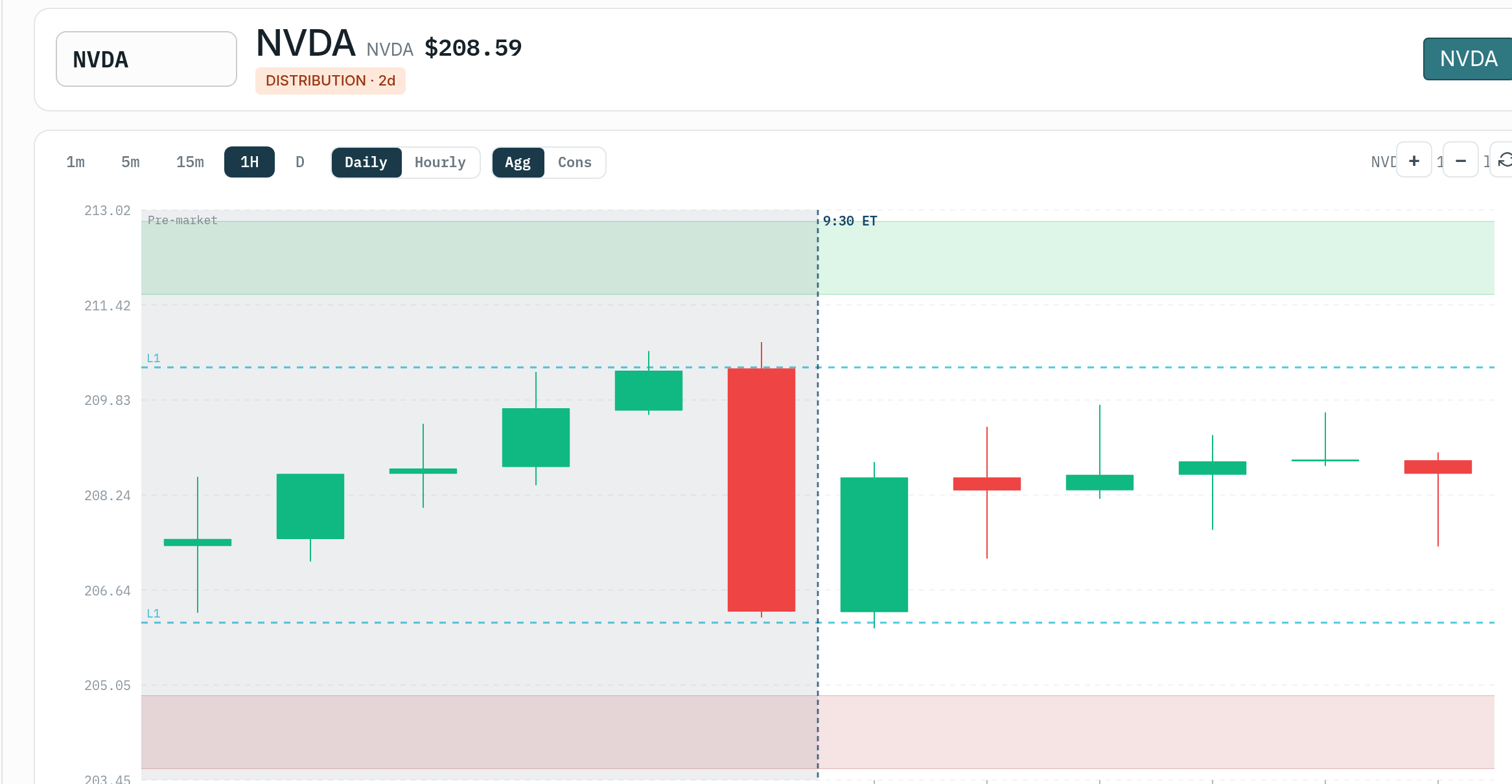
Click the MSFT symbol to open its Symbol Page. This dedicated view provides visual confirmation and additional context for the signal. You’ll see:

  • Hourly Chart: Shows the current VB levels plotted with price action
  • Daily Chart: Shows broader context and trend structure
  • Recent Performance: Table of the last 5 VB signals on MSFT and their outcomes
  • Market Pulse Chart: 150-day view showing trend stages

Look for these confirmation factors to validate the signal before executing: This is an important aspect of using the platform effectively. This information is valuable for understanding how to use the platform more effectively.

  1. Price is above the entry level: If entry was $378.50 and price is currently at $378.75, the signal is still valid
  2. Clear distance to stop: You should see visual separation between current price and the stop level
  3. Trend structure supports the direction: On the daily chart, is MSFT in an uptrend with higher highs and higher lows? If yes, the LONG signal aligns with the bigger picture
  4. Recent performance is positive: If the last 5 signals show 3 targets hit and 2 stops, that’s solid

If all these factors check out, you have a validated signal ready for execution. The visual confirmation adds a qualitative layer to the quantitative scoring, helping you avoid signals that score well numerically but fail the “eyeball test” on the charts. This two-layer validation process significantly improves trade quality.

Step 6: Prepare Trade Details for Your Broker (30 seconds)

Write down or screenshot the trade details to ensure accuracy when entering the order in your broker. Having these details clearly documented prevents entry errors:

Symbol: MSFT
Direction: LONG
Entry: $378.50 (or current price if above)
Stop Loss: $376.20
Target: $380.80
Position Size: [Calculate based on your risk tolerance]

Position Sizing Example

Let’s say you have a $10,000 account and you risk 1% per trade ($100). The distance from entry to stop is $2.30 per share. This 1% risk rule is a standard position sizing approach that protects your account from large drawdowns.

Position Size = Risk Amount ÷ Stop Distance = $100 ÷ $2.30 = 43 shares. This calculation ensures that if the trade hits your stop loss, you’ll lose exactly $100 (1% of your account), no more.

Total position cost = 43 shares × $378.50 = $16,275.50 (requires margin or smaller position if cash account). Since this exceeds your $10,000 account balance, you’ll either need a margin account or must adjust your position size to fit within cash constraints.

For a cash account with $10,000, you might trade 26 shares instead: 26 × $378.50 = $9,841. Your risk = 26 × $2.30 = $59.80 (0.6% account risk). This reduced position size lowers your risk percentage below the 1% target, which is actually conservative and helps preserve capital while you learn the system.

Step 7: Execute in Your Broker (60 seconds)

Open your brokerage platform (ThinkorSwim, Interactive Brokers, TradeStation, etc.) and enter the order with precision. Double-check all details before submitting:

  1. Order Type: Limit order at $378.50 or market order if price is still near entry
  2. Quantity: 26 shares (from position sizing calculation)
  3. Stop Loss Order: Immediately place a stop at $376.20 (never trade without a stop)
  4. Target Order: Place a limit sell order at $380.80

If you’re using ThinkorSwim and have VB studies installed (from the Indicator Generator), you’ll see the entry, stop, and target levels plotted directly on your chart for visual reference. This makes execution easier and helps you time your entry if you’re waiting for a specific price level. The visual levels also provide confidence that you’re executing the setup correctly.

Step 8: Monitor Signal Status (Ongoing)

Back in the Volatility Box platform, the signal status will update in real-time as price moves. This automated tracking eliminates the need to manually monitor every position:

  • It stays “Open” while price is between stop and target
  • It changes to “Target Hit” if price reaches $380.80
  • It changes to “Stopped” if price drops to $376.20
  • It changes to “EOD” if the market closes before hitting either level

Check the Scanner every 30-60 minutes to see status updates and monitor how your active trades are progressing. This periodic review keeps you informed without requiring constant screen time. You’ll quickly see which signals are moving toward targets and which are struggling, helping you make informed decisions about position management.

What to Expect: Realistic Outcomes

With an 84 conviction signal showing 58% win rate and +$0.42 expectancy, here’s what to expect from this trade and how the probabilities play out. Realistic expectations prevent emotional reactions to normal outcomes:

Scenario 1: Target Hit (58% probability) This is an important aspect of using the platform effectively. This information is valuable for understanding how to use the platform more effectively.

Price moves to $380.80 within 2-4 hours. You make $2.30 per share × 26 shares = +$59.80 profit (0.6% account gain). This is the most likely outcome based on historical data, representing a clean winning trade where the signal performed as expected.

Scenario 2: Stop Hit (42% probability) This is an important aspect of using the platform effectively. This information is valuable for understanding how to use the platform more effectively.

Price reverses and drops to $376.20. You lose $2.30 per share × 26 shares = -$59.80 loss (0.6% account loss). This will happen about 4 out of 10 trades and is a normal part of trading. The key is accepting this outcome without emotional reaction and moving on to the next signal.

Scenario 3: EOD Exit (varies) This is an important aspect of using the platform effectively. This information is valuable for understanding how to use the platform more effectively.

Market closes at $379.50. You’re up $1.00 per share × 26 shares = +$26 profit. You can hold overnight if you’re comfortable with gap risk, or close for a small gain. Many traders close Hourly Aggressive signals at end of day regardless of P&L to avoid overnight gap exposure, while others use trailing stops to protect profits.

Over 10 trades with these statistics, you’d expect roughly 6 wins (+$358.80) and 4 losses (-$239.20) for a net +$119.60. That’s the +$0.42 expectancy playing out over a sample size. This example shows why expectancy matters more than win rate alone – even with losses, the math works in your favor over time if you execute consistently.

Common First-Trade Questions

Q: What if price is already past the entry level when I find the signal? Visual confirmation on charts helps validate the statistical signals and improves entry timing.

If MSFT entry was $378.50 but it’s now at $379.20, you can still enter if the setup still meets key criteria. Evaluate these factors before chasing the entry:

  • The signal status is still “Open” (hasn’t hit target or stop)
  • There’s still reasonable distance to target (at least 1:1 reward-to-risk from current price)
  • You’re comfortable with the larger stop distance from your actual entry

Alternatively, wait for a pullback closer to $378.50, or skip this signal and find another at a better entry price. There’s no shortage of VB signals throughout the day, so missing one entry doesn’t mean missing your only opportunity. Patience with entries significantly improves your results over time.

Q: Should I always use the exact entry/stop/target prices? Proper risk management using these levels is essential for long-term profitability.

The VB levels are guidelines based on statistical bands. Some traders enter at the exact level, others wait for confirmation (like a 5-minute candle close above the level). The stop should be honored – it’s the statistical invalidation point. The target can be adjusted based on your profit-taking strategy (some take 50% at target and trail the rest). Your execution style can be adapted to your personality while still following the core VB framework.

Q: How long do I hold the trade? This is an important aspect of using the platform effectively.

For Hourly Aggressive and Hourly Conservative signals, most traders day trade them (close by end of day). For Daily Aggressive and Daily Conservative, hold overnight and manage over 1-5 days. The Model Type tells you the intended timeframe. Matching your trading style to the appropriate model type is essential – don’t try to swing trade Hourly signals or day trade Daily signals.

Next Steps

You’ve now executed your first VB signal. Here’s what to do next to build on this foundation:

  1. Take a screenshot of the Scanner view and your broker execution for your trading journal
  2. Set a calendar reminder to check signal status in 1-2 hours
  3. Review conviction score breakdown in the “Understanding Conviction Score” article to learn why this signal ranked 84
  4. Practice finding 2-3 more signals using different filters to get comfortable with the Scanner
  5. Backtest the symbol to see 450 days of performance data and build confidence in the setup

The workflow gets faster with repetition. After 5-10 signals, you’ll be scanning and executing in under 2 minutes. The process becomes automatic, allowing you to focus more mental energy on trade management and less on signal selection. This efficiency is one of the key advantages of the VB system – it removes the paralysis of too many choices and gives you a clear, repeatable process.

Was this article helpful?

Still need help?

Can't find what you're looking for? Our support team is here to help.

Contact Support