Dashboard Guide
Your Market Command Center
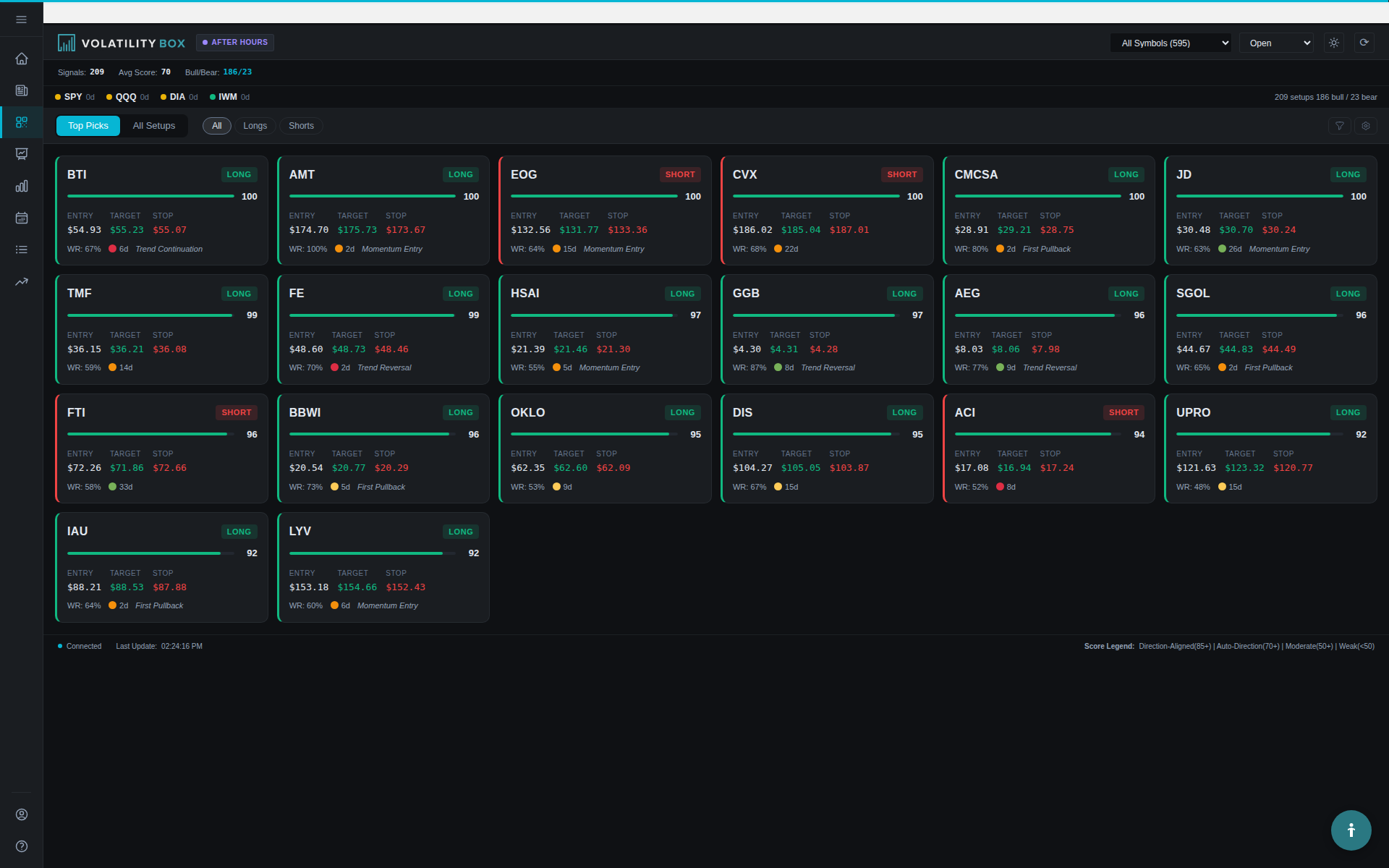
The Dashboard is your first stop every trading day. Instead of diving straight into the Scanner and getting lost in dozens of signals, the Dashboard gives you a 30-second overview of current market conditions, signal activity, and the best opportunities available.
Think of it as your trading cockpit – the high-level view that helps you make strategic decisions before tactical execution. Visual confirmation on charts helps validate the statistical signals and improves entry timing.
Active Breaches Card: Total Signal Count
What it shows: The total number of VB signals currently active, broken down by LONG and SHORT This visualization makes it easy to understand the data at a glance. This information is valuable for understanding how to use the platform more effectively.
Example display:
Active Breaches: 28
LONG: 18 | SHORT: 10
How to interpret it:
- Total count 15-25: Normal signal activity, balanced market
- Total count 30-45: High volatility, lots of opportunities, but also more noise
- Total count <10: Quiet market, consolidation phase, be more selective
- LONG > SHORT by 2:1 or more: Bullish market bias, focus on long setups
- SHORT > LONG by 2:1 or more: Bearish market bias, focus on short setups or stay defensive
In the example above (18 LONG, 10 SHORT), the market has a slight bullish bias. This suggests filtering the Scanner for LONG signals will yield better opportunities than fighting the broader trend.
Market Bias Visualization
What it shows: A visual gauge showing the percentage split between bullish and bearish signals This visualization makes it easy to understand the data at a glance. This information is valuable for understanding how to use the platform more effectively.
Example: 64% LONG | 36% SHORT (displayed as a progress bar or pie chart) This illustrates the concept in a practical, real-world context. This information is valuable for understanding how to use the platform more effectively.
How to use it:
- 70%+ LONG: Strong bullish bias. Focus on long positions, be cautious with shorts
- 70%+ SHORT: Strong bearish bias. Focus on short positions or stay in cash
- 45-55% split: Balanced market, no clear bias, be selective in both directions
- 60-69% one direction: Moderate bias, favor that direction but don’t ignore the other
The Market Bias helps you align with the overall market flow. Trading with the bias (going long when 70% of signals are long) typically produces better results than counter-trading.
Real-World Example
You log in at 9:45 AM and see: This is an important aspect of using the platform effectively. This information is valuable for understanding how to use the platform more effectively.
- Active Breaches: 32
- Market Bias: 75% LONG | 25% SHORT
This tells you the market opened with strong buying pressure. When you filter the Scanner, focus on LONG signals with WITH-trend alignment and Green Market Pulse. SHORT signals will likely struggle against the bullish momentum.
S&P 100 Tracking
What it shows: The number of VB signals currently active on S&P 100 blue-chip stocks This visualization makes it easy to understand the data at a glance. This information is valuable for understanding how to use the platform more effectively.
Example display:
S&P 100 Signals: 12
(out of 28 total signals)
Why it matters:
S&P 100 stocks are household names: AAPL, MSFT, GOOGL, JPM, JNJ, WMT, etc. These are highly liquid, lower-risk instruments compared to small-cap or high-volatility stocks.
If you see 10+ S&P 100 signals, it means quality blue-chip opportunities are available. This is ideal for:
- Conservative traders who prefer lower volatility
- Large account traders who need high liquidity for big positions
- IRA or retirement accounts where risk management is critical
If S&P 100 count is low (2-3), you might need to venture into mid-cap names or wait for better setups. This is an important aspect of using the platform effectively.
Latest Signals Panel: Real-Time Feed
What it shows: The 5-10 most recent VB signals, displayed with key details: This visualization makes it easy to understand the data at a glance. This information is valuable for understanding how to use the platform more effectively.
- Symbol and direction (e.g., AAPL LONG)
- Entry price
- Conviction score
- Time triggered
How to use it:
This panel updates in real-time as new signals trigger throughout the day. It’s perfect for monitoring fresh opportunities without constantly refreshing the Scanner.
Example entry:
NVDA LONG | Entry: $485.20 | Conviction: 82 | 9:42 AM
If you see a high-conviction signal (80+) appear in this feed, click through to the Scanner or Symbol Page for detailed analysis. Fresh signals (triggered in the last 15-30 minutes) often have better entry prices than stale signals from 2+ hours ago.
Pro Tip: Morning Routine
Check the Latest Signals panel at 9:35 AM (5 minutes after market open) to see which symbols are showing early momentum. If you see 3-4 signals on tech stocks (AAPL, MSFT, NVDA) all triggering within minutes of each other, it suggests sector-wide momentum you can capitalize on.
Top Conviction Trades: Ranked Opportunities
What it shows: The 5-10 highest conviction signals currently available, sorted by conviction score This visualization makes it easy to understand the data at a glance. This information is valuable for understanding how to use the platform more effectively.
Example display:
1. MSFT LONG | Conviction: 88 | Entry: $378.50
2. SPY LONG | Conviction: 85 | Entry: $451.80
3. AAPL LONG | Conviction: 84 | Entry: $179.20
4. GOOGL LONG | Conviction: 82 | Entry: $142.10
5. QQQ LONG | Conviction: 81 | Entry: $385.30
How to use it:
This is your quick-scan tool for finding the best setups without filtering the full Scanner. If you only have 2 minutes to find a trade, scan this list for:
- Conviction 80+ (high quality)
- Symbols you’re familiar with
- Directional bias that matches your preference (LONG or SHORT)
Click any signal to jump directly to its Symbol Page for visual confirmation, then execute in your broker. This action takes just a few seconds and provides immediate access to the information you need.
When to Use Top Conviction vs Scanner
Use Top Conviction when: This is an important aspect of using the platform effectively. This information is valuable for understanding how to use the platform more effectively.
- You have <5 minutes to find and execute a trade
- You want the simplest, highest-quality setups without filtering
- You’re new and want to focus only on the best opportunities
Use the Scanner when: This is an important aspect of using the platform effectively. This information is valuable for understanding how to use the platform more effectively.
- You have 10+ minutes to analyze multiple setups
- You want to filter by specific criteria (model type, signal type, watchlist)
- You’re looking for swing trades vs day trades (model filter required)
Market Pulse Distribution: Trend Assessment
What it shows: A breakdown of signals by Market Pulse color (Green, Yellow, Orange, Red) This visualization makes it easy to understand the data at a glance. These color codes provide instant visual feedback without requiring detailed analysis of numbers.
Example display:
Market Pulse Distribution:
Green: 14 signals (50%)
Yellow: 9 signals (32%)
Orange: 3 signals (11%)
Red: 2 signals (7%)
How to interpret it:
- 50%+ Green signals: Strong trending market, ideal for momentum trading. Trade WITH-trend setups aggressively.
- 50%+ Yellow signals: Moderate trends with consolidation. Still tradeable, but use tighter stops and take profits faster.
- 50%+ Orange/Red signals: Choppy, range-bound market. Reduce position sizes, increase conviction requirements (80+), or stay in cash.
In the example above, 82% of signals are Green or Yellow (14 + 9 = 23 out of 28). This is a healthy trending environment where VB signals are likely to follow through.
If you saw 60% Red signals, that’s a warning: the market is choppy and directionless. Wait for cleaner trends or trade smaller sizes.
Auto-Refresh Functionality
What it does: The Dashboard auto-refreshes every 30-60 seconds to show updated signal counts, new signals, and conviction changes This is an important aspect of using the platform effectively. Regular updates ensure you are working with current data and not making decisions based on stale information.
How to use it:
Keep the Dashboard open in one browser tab while you have the Scanner or Symbol Pages open in others. Glance at the Dashboard periodically to monitor:
- Has the total signal count increased? (New opportunities emerging)
- Has the LONG/SHORT bias shifted? (Market sentiment changing)
- Are new high-conviction signals appearing in the Latest Signals feed?
If you’re trading during Power Hour (3-4 PM) and you see the Active Breaches count jump from 15 to 28, that suggests a late-day momentum surge worth investigating. Trend and momentum alignment are critical factors that significantly increase win rates.
Morning Routine Using the Dashboard
Here’s a practical workflow for starting your trading day: This is an important aspect of using the platform effectively. This information is valuable for understanding how to use the platform more effectively.
Step 1: Pre-Market Review (9:25-9:29 AM)
- Log in and open Dashboard
- Note Active Breaches count (is it high, low, or normal?)
- Check Market Bias (LONG or SHORT dominant?)
- Review S&P 100 count (are blue chips active or quiet?)
- Scan Top Conviction list for any obvious 85+ setups
Time: 60 seconds
Step 2: Opening Bell (9:30-9:35 AM)
- Watch Latest Signals panel for fresh signals triggering
- Note which sectors/symbols are moving (tech, energy, finance, etc.)
- If 3+ high-conviction signals appear within 5 minutes, investigate the Scanner for entry opportunities
Time: 90 seconds
Step 3: Trade Execution (9:35-9:45 AM)
- Click a Top Conviction signal or jump to Scanner
- Apply filters based on Dashboard insights (e.g., LONG only if 70% bias, Green MP if 50%+ Green)
- Select 1-2 setups and verify on Symbol Pages
- Execute in broker
Time: 3-5 minutes
Total morning workflow: Under 7 minutes from login to executed trade. This is an important aspect of using the platform effectively.
Midday Check-In Workflow
Around 12:00-1:00 PM (lunch hour), check the Dashboard again: This is an important aspect of using the platform effectively. This information is valuable for understanding how to use the platform more effectively.
- Has the bias shifted? If morning was 75% LONG and it’s now 55% LONG, momentum is fading. Tighten stops on open positions.
- Market Pulse Distribution changed? If Green signals dropped from 50% to 20%, the market is losing trend strength. Be more conservative with new entries.
- Latest Signals showing fresh activity? If 3-5 new signals triggered in the last 30 minutes, there might be a midday reversal or continuation worth trading.
This 2-minute check helps you adapt to changing market conditions instead of trading on stale morning assumptions. This is an important aspect of using the platform effectively.
Power Hour Monitoring (3:00-4:00 PM)
The Dashboard is especially useful during Power Hour for spotting late-day momentum: Trend and momentum alignment are critical factors that significantly increase win rates. This information is valuable for understanding how to use the platform more effectively.
- 3:00 PM: Check if Active Breaches count is increasing (late-day acceleration)
- 3:15 PM: Review Latest Signals for fresh triggers with 80+ conviction
- 3:30 PM: Check Market Bias – if it strengthened in one direction (e.g., went from 60% LONG to 75% LONG), there’s closing momentum
- 3:45 PM: Final scan of Top Conviction for any close-only trades (enter at 3:55, exit at 3:59)
Dashboard Red Flags: When to Stay Out
Certain Dashboard conditions suggest it’s better to stay in cash or trade smaller: This is an important aspect of using the platform effectively. This information is valuable for understanding how to use the platform more effectively.
- Active Breaches <8: Very quiet market, not enough opportunities, likely consolidation
- Market Bias 45-55% split: No clear directional bias, choppy conditions
- Market Pulse Distribution >50% Orange/Red: Weak trends, high chop, low follow-through
- Top Conviction list shows all signals <75 conviction: Even the best setups are mediocre quality
- S&P 100 count = 0-2: Blue chips aren’t moving, only speculative names active (higher risk)
If you see 2-3 of these conditions, consider staying in cash or paper trading until market conditions improve. This is an important aspect of using the platform effectively.
Common Dashboard Mistakes
Mistake 1: Ignoring Market Bias This is an important aspect of using the platform effectively. This information is valuable for understanding how to use the platform more effectively.
Going heavy on SHORT positions when Market Bias shows 75% LONG signals. You’re fighting the flow. Align with the bias or stay neutral.
Mistake 2: Not checking before executing This is an important aspect of using the platform effectively. This information is valuable for understanding how to use the platform more effectively.
Jumping straight to the Scanner without the 30-second Dashboard overview. You miss critical context like low signal count or choppy Market Pulse distribution.
Mistake 3: Trading stale Top Conviction signals This is an important aspect of using the platform effectively. This information is valuable for understanding how to use the platform more effectively.
Taking a signal from the Top Conviction list that triggered 3 hours ago. Always check Entry Time before executing – signals lose edge as they age.
Mistake 4: Over-trading high signal counts This is an important aspect of using the platform effectively. This information is valuable for understanding how to use the platform more effectively.
Seeing 45 Active Breaches and trying to trade 10 setups because “there’s so much opportunity.” High counts often mean high volatility and noise. Stick to 2-4 quality trades regardless of total count.
Key Takeaways
- The Dashboard provides a 30-second market overview before you dive into the Scanner
- Active Breaches count shows total signal activity and LONG/SHORT split
- Market Bias (% LONG vs SHORT) helps you align with the dominant trend
- Latest Signals panel tracks fresh opportunities in real-time
- Top Conviction Trades ranks the best 5-10 setups for quick scanning
- Market Pulse Distribution shows whether the market is trending (Green/Yellow) or choppy (Orange/Red)
- Use the Dashboard 3 times per day: pre-market, midday check-in, power hour
- Dashboard red flags (low count, 50/50 bias, >50% Orange/Red MP) suggest staying in cash
Start every trading session with the Dashboard, and you’ll make smarter decisions about which signals to pursue and which market conditions to avoid. This is an important aspect of using the platform effectively.
Was this article helpful?
Still need help?
Can't find what you're looking for? Our support team is here to help.
Contact Support