Advanced Filtering
What filtering does
The Scanner can list a hundred or more active setups across every model and symbol. The filter panel narrows that to the few that match a given direction, timeframe, and risk preference. This guide documents each real filter and how it changes the list.

Watch: Part 6 of the Volatility Box onboarding series.
The filters
Click the filters icon to open the panel. Each filter below maps to a control in it.
Direction
Long, short, or both. One click drops the list to a single side, which keeps the other side off the screen when the market clearly favors one direction.
Trend / counter-trend
Show with-trend setups only, or counter-trend setups only. With-trend setups run with the prevailing move; counter-trend setups fade an extended move back toward the Market Pulse line. The Volatility Box is a counter-trend framework, so this filter separates the deeper reversal reads from the with-trend continuations.
Swing
Surface the names where today’s swing is much larger than the baseline, or only the names where today’s volatility is in line with the volatility the model is built around. This is how to separate the unusually active names from the ones behaving normally.
Entry proximity
Check “entry only” to show just the setups still near their entry price or better. It filters out the trades already making their way toward target, so the list shows the volatility edge while it can still be taken, not setups to chase.
Model and sensitivity
Filter on the model (Daily or Hourly) and its sensitivity (Aggressive or Conservative). All and all is fine on quiet days. When the markets start to move, narrowing to daily and conservative, or daily and all, filters out the hourly models and shortens the list.
- Hourly models give one level per hour, more intraday opportunities.
- Daily models give one level per day, weightier and swing-oriented.
- Aggressive models are easier to reach; conservative models are wider and harder to hit, favored around earnings, FOMC, and naturally high-volatility names.
Reward-to-risk
Skew toward setups with a particular reward-to-risk profile, for example risking 1.5 to make one, or risking 2 to make one. The same control can skew toward trades that, at entry, sit closer to their stop.
Regime / stage
Filter by Market Pulse stage. With the S&P in acceleration, focusing on the stocks in the green or acceleration phase surfaces the names in fresh trends to ride a new move. The stages are Accumulation and Acceleration (long lean) and Distribution and Deceleration (short lean).
Watchlist
Switch the source list from all setups to one of your watchlists, to show only the names you track.
Signal types: TR, FP, ME
Each setup is tagged with the type of move that triggered it, and the list can be filtered by type:
- TR, Trend Reversal. Counter-trend. The breach fires against the prevailing trend, fading an extended move back toward the Market Pulse line. The deeper, lower-probability read, with larger winners when it works.
- FP, First Pullback. With-trend. The first retracement inside an established trend, entered in the trend’s direction.
- ME, Momentum Entry. With-trend. An entry that triggers as momentum pushes in the trend’s direction, a continuation rather than a fade.
FP and ME are with-trend; TR is counter-trend. The type and the trend / counter-trend filter overlap: filtering to with-trend surfaces FP and ME, filtering to counter-trend surfaces TR.
The edge grade and score
Every setup also carries the edge grade (A+, A, B, and down) and its 0 to 100 edge score, which summarize how many of the model’s conditions line up. The grade ranks the list rather than acting as a hard cutoff. Read the list top-down from the strongest grade rather than setting an arbitrary score threshold.
Stacking filters
The point of the panel is to apply whatever the market is doing onto the entire Scanner. Set the direction to match the day’s lean, narrow the model and sensitivity to the timeframe being traded, add a watchlist or a stage, and a list of 103 names becomes a manageable handful in a couple of clicks.
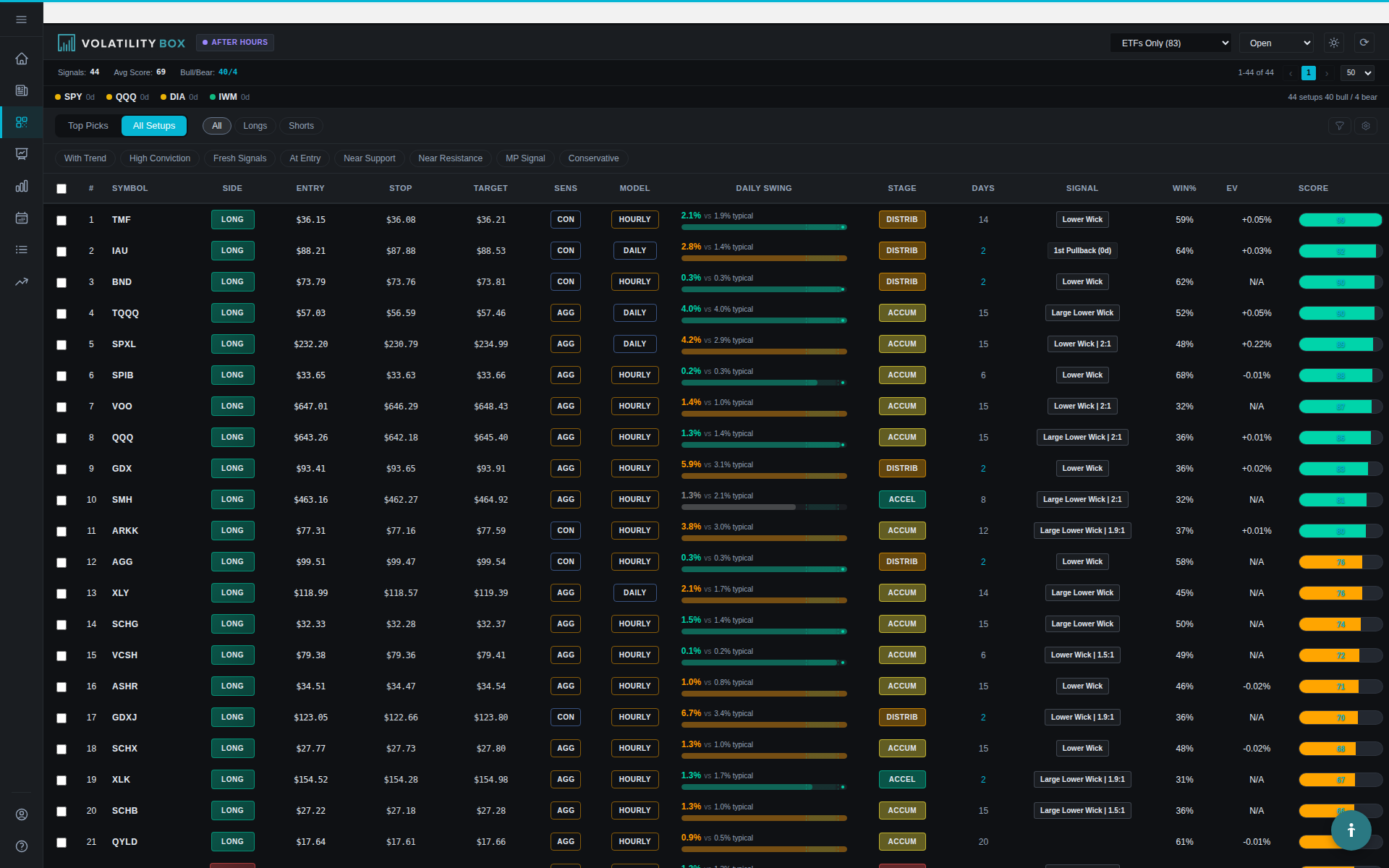
The Closed tab
Over by the toggles is the Closed tab, which shows setups that already hit target or stopped today. A stopped name is often still worth watching once setups are understood. On an earnings day where a stock is selling off, the name may have breached the aggressive models but not yet hit the conservative. The Closed tab shows that, for example, JP Morgan or United Healthcare just stopped out, which means volatility is rising in that name: it breached the hourly aggressive models, so the next breach toward the conservative is what to watch for. Where volatility is really picking up, the daily breaches to come can be anticipated. A setup can also be applied where price is flirting on the outer edge of the models, still a live setup at a better entry, with the stop adjusted off the pivot price is giving. A stopped name is a watchlist for the next breach, not a dead one.
Common mistakes
- Over-filtering. Stacking too many narrow conditions can leave zero setups on a normal day. Balance selectivity against having something to trade.
- Under-filtering. No filters leaves a long, unmanageable list. Set at least direction and model.
- Reading win rate alone. A high hit rate with thin expectancy still loses. Read the backtest win rate together with expectancy.
- Ignoring the stage. A counter-trend (TR) setup against the Market Pulse stage is lower probability. Know which one is being taken.
Related
Was this article helpful?
Still need help?
Can't find what you're looking for? Our support team is here to help.
Contact Support