Watchlist Management
Why Use Watchlists?
The Volatility Box platform tracks 590 symbols, which represents far too many to monitor effectively or develop expertise with. Watchlists allow you to focus on 10-20 symbols you know intimately, significantly increasing your win rate by trading only familiar stocks where you understand their typical behavior patterns. This focused approach creates specialization rather than overwhelming diversification.
Traders who specialize on a small, curated watchlist consistently outperform those who trade random signals across hundreds of unfamiliar symbols. Specialization breeds expertise, pattern recognition, and the intuition needed to identify when a symbol is behaving normally versus abnormally. This knowledge edge cannot be replicated by trading everything that shows a signal.
Accessing the Watchlist Manager
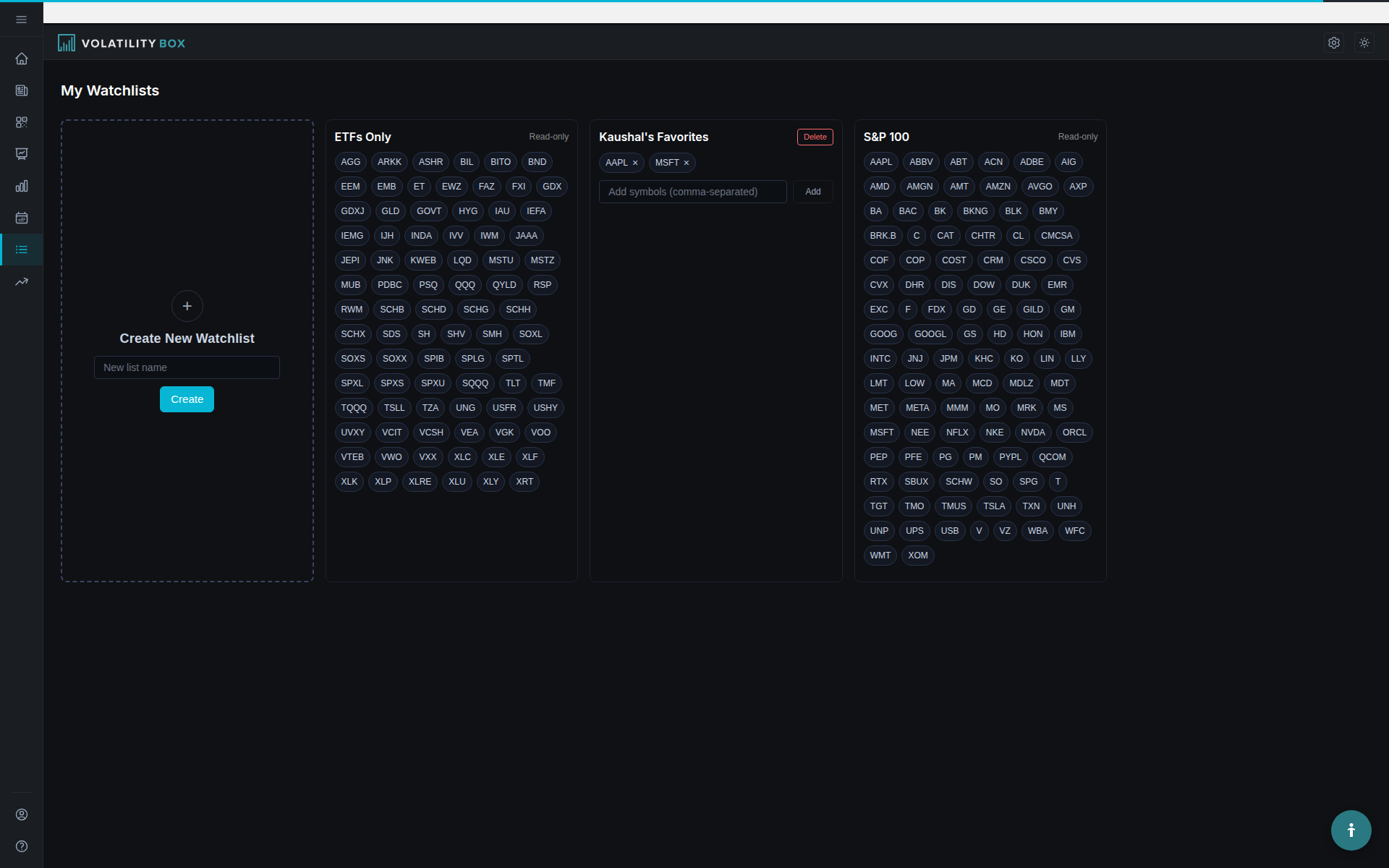
Navigate to the Watchlists section from the main sidebar to access all watchlist management functions. The interface is organized into clear sections for easy navigation. You’ll see your personal lists alongside any pre-built lists the platform provides.

- Your Custom Lists: Lists you’ve created
- Pre-Built Lists: S&P 100 (read-only)
- Create New List: Button to add new watchlist

Creating Your First Watchlist
Creating a custom watchlist is straightforward and takes less than a minute. The key is choosing a descriptive name that reflects the purpose or strategy. Having clear naming helps you quickly select the right list when filtering Scanner results.
Step-by-Step Process
- Click “Create New Watchlist” button
- Enter watchlist name (e.g., “Tech Momentum”, “Swing Trades”, “Scalping”)
- Add description (optional but helpful for future reference)
- Start with empty list or import from existing
- Click “Create”

Naming Conventions
Good watchlist names are descriptive and strategy-specific, immediately telling you the purpose and focus. Avoid generic names that don’t convey meaning or strategy intent. Think about what would be helpful to you three months from now when looking at your list of watchlists.
| Good Names | Why |
|---|---|
| Tech High Beta | Clear sector + characteristic |
| Swing Trades 3-5 Day | Strategy + timeframe |
| Opening Bell Scalps | Time-specific + style |
| Squeeze Candidates | Setup-specific |
| Avoid These Names | Why |
|---|---|
| List 1 | Not descriptive |
| Good Stocks | Too vague |
| Main | Doesn’t indicate purpose |
Adding Symbols to Watchlists
There are several efficient methods to add symbols, each suited to different situations and workflows. Understanding all methods gives you flexibility. The best method depends on whether you’re adding individual symbols or bulk importing.
Method 1: Manual Entry
Manual entry works best when adding individual symbols one at a time. The autocomplete feature prevents typos and ensures you’re adding supported symbols. This method is most common when you discover a new symbol to track.
- Open watchlist
- Click “Add Symbol”
- Type symbol (e.g., AAPL) or company name
- Select from autocomplete dropdown
- Click “Add”
Method 2: Add from Scanner
This method is perfect when you find a signal you want to track for future reference. It’s the fastest way to build your watchlist during active trading sessions. You can add symbols without leaving the Scanner view.
- Find signal in Scanner table
- Click “⋮” menu icon on row
- Select “Add to Watchlist”
- Choose destination list
- Confirm

Method 3: Bulk Import
Bulk import is ideal when you have a pre-determined list of symbols from external research or another tool. This saves significant time compared to adding symbols individually. The validation step ensures only supported symbols make it into your list.
- Open watchlist
- Click “Import Symbols”
- Paste comma-separated list (e.g., AAPL,MSFT,GOOGL,AMZN)
- Platform validates symbols against supported 590 symbols
- Click “Import”
Symbol Validation
The platform only accepts symbols from the 595 supported stocks, ensuring that Volatility Box data is available for everything on your list. If you enter an unsupported symbol, you’ll see an error message: “Symbol not found in VB database.” This validation prevents wasted time tracking symbols that don’t have VB signals.
Watchlist Organization Strategies
How you organize your watchlists directly impacts your trading efficiency and ability to quickly find the right symbols for current market conditions. Different organizational approaches suit different trading styles and preferences. Consider creating multiple lists using different organizational methods to match various scenarios.
Strategy 1: By Trading Style
Create separate lists for each distinct trading approach you use, as different styles require different symbol characteristics. This organization makes it easy to switch between strategies based on market conditions or time available. Each list should contain symbols optimized for that specific trading style.
- Scalping (10-15 symbols): High liquidity, tight spreads, high volume (AAPL, SPY, QQQ, TSLA, NVDA)
- Day Trading (15-20 symbols): Moderate volatility, clear intraday trends
- Swing Trading (10-15 symbols): Trend-following stocks, lower beta, predictable patterns
Strategy 2: By Sector
Grouping stocks by sector enables correlated trading, where you can capitalize on sector-wide momentum. When a sector enters a strong trend, you can focus entirely on that sector’s watchlist. Sector rotation is a powerful edge that this organization method facilitates.
- Tech Leaders: AAPL, MSFT, GOOGL, AMZN, META, NVDA
- Financials: JPM, BAC, GS, MS, WFC
- Healthcare: JNJ, UNH, PFE, ABBV
- Energy: XOM, CVX, COP, SLB
When the tech sector is hot and outperforming, focus exclusively on your Tech Leaders list. When energy rallies on oil price movements, switch your attention to the Energy list. This sector rotation approach keeps you in the strongest part of the market.
Strategy 3: By Volatility/Beta
Matching symbols to your risk tolerance and account size is important for sustainable trading. Higher beta stocks require larger stops and smaller position sizes. Lower beta stocks allow tighter stops and potentially larger positions, making them suitable for conservative approaches.
- High Beta (10 symbols): TSLA, NVDA, AMD, COIN, MARA (for aggressive trading)
- Medium Beta (15 symbols): AAPL, MSFT, GOOGL, V, MA (balanced)
- Low Beta (10 symbols): KO, PG, JNJ, WMT, PEP (conservative swing trades)
Strategy 4: By Performance
Tracking which symbols work best for your specific trading style is one of the most powerful uses of watchlists. Your personal performance data trumps theoretical analysis. Building lists based on your actual results creates a virtuous cycle of improvement.
- Winners: Symbols with 70%+ win rate in your trading journal
- Learning: Symbols you’re testing (track for 20 trades before deciding)
- Avoid: Symbols with <40% win rate (know what to skip)
Managing Watchlist Content
Watchlists are living documents that should evolve as your experience grows and market conditions change. Regular updates keep your lists relevant and high-quality. Stale watchlists with symbols you never trade just create clutter and confusion.
Adding New Symbols
Don’t rush to add symbols without proper evaluation. Quality over quantity is the guiding principle. New additions should earn their way onto the list through demonstrated performance. This disciplined approach prevents your watchlist from ballooning with marginal symbols.
Add a symbol when you’ve tracked it for 5+ trades with a 60%+ win rate, proving it works for your style. Include it if it consistently shows up in the Scanner with high conviction, indicating good VB methodology fit. Verify it respects Volatility Box levels by checking Symbol Page recent performance data. Finally, ensure you understand its personality: how it typically moves, its usual ranges, and its quirks.
Removing Symbols
Be ruthless about removing symbols that aren’t working, as keeping losers on your list just tempts you to trade them. Your watchlist should represent your best opportunities, not a comprehensive directory. Regular pruning is essential for maintaining watchlist quality.
Remove symbols with win rates below 40% after 15+ trades, as this sample size confirms they’re not a good fit. Cut consistently choppy symbols that don’t respect VB levels, even if they look good on paper. Remove symbols with stops too wide for your account size, as proper risk management is impossible. Drop stocks with monthly earnings as they’re too news-driven and unpredictable. Finally, remove symbols you haven’t traded for 30+ days, as they represent dead weight taking up mental space.
How to remove: Open watchlist → Click “✕” next to symbol name → Confirm removal
Reordering Symbols
Put your most-traded symbols at the top of your watchlist for quick visual scanning and access. This small optimization saves time during fast-moving markets. If drag-and-drop reordering is supported, use it; otherwise, manually delete and re-add symbols in your desired order.
Integrating Watchlists with Other Features
Watchlists connect seamlessly to multiple platform features, multiplying their value beyond simple symbol organization. Understanding these integrations unlocks powerful workflow efficiencies. Proper integration transforms watchlists from static lists into dynamic trading tools.
Scanner Integration
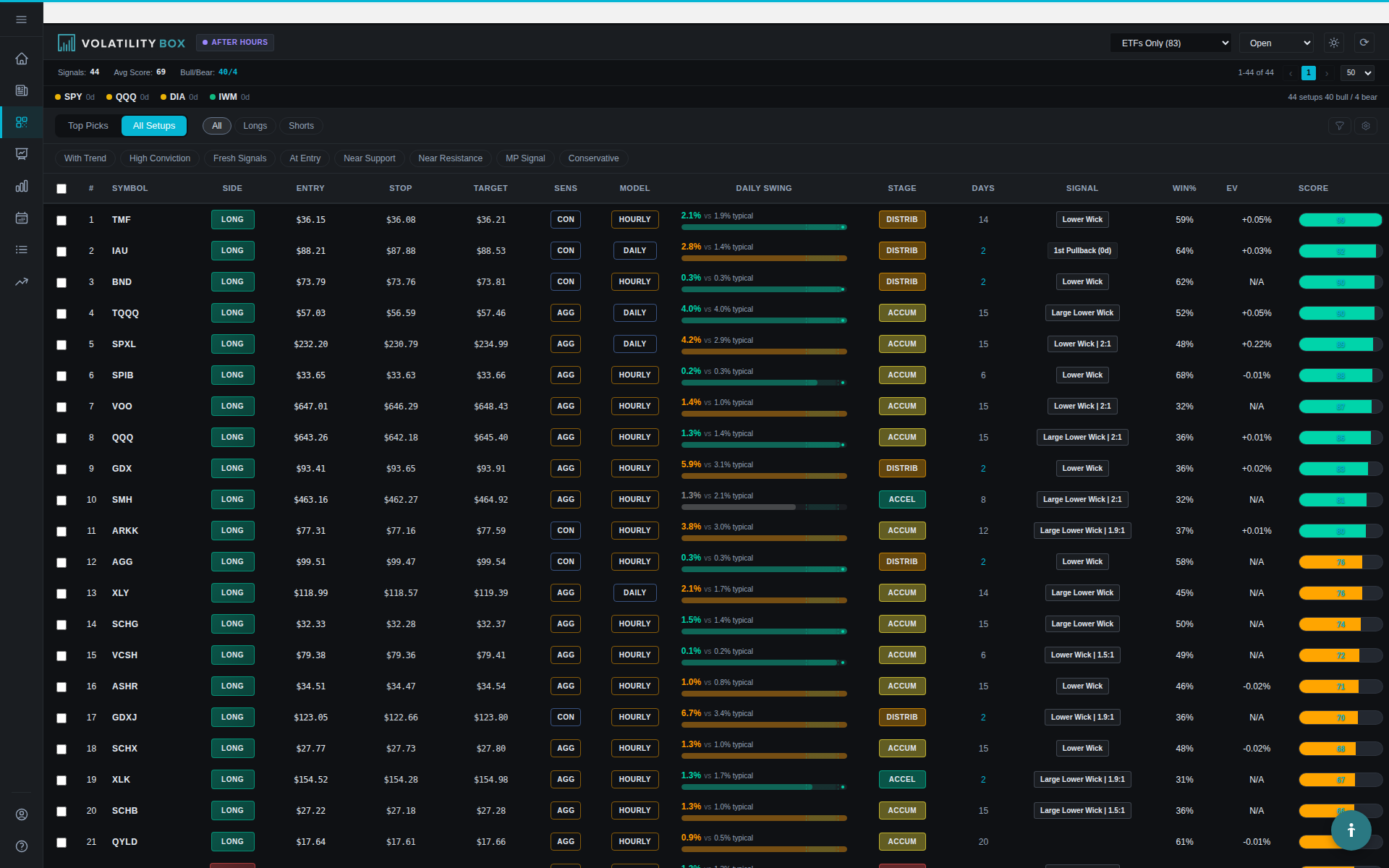
The Scanner filter is the most powerful watchlist integration, dramatically reducing signal overload. Instead of reviewing 100+ signals across all 590 symbols, you see only signals from your curated list. This focused approach increases your edge by keeping you in your circle of competence.
- Open Scanner
- Select “Watchlist” filter dropdown
- Choose your watchlist (e.g., “Swing Trades 3-5 Day”)
- Scanner shows only signals from that list

This is significant for focused trading and maintaining discipline. Instead of 100+ signals across all 590 symbols creating analysis paralysis, you see only 5-10 signals from your curated list. This filtered view keeps you trading your edge rather than chasing random opportunities.
Indicator Generator Integration
Generate ThinkorSwim studies for your entire watchlist at once, saving hours of manual work. This bulk generation ensures all your tracked symbols have updated indicators. The efficiency gain here is substantial for active traders who want indicators on multiple symbols.
- Go to Indicator Generator
- Select watchlist from dropdown
- Click “Generate All”
- Platform creates .ts files for all symbols in list
- Download as .zip file
- Import to ThinkorSwim
See dedicated article: Generating VB Studies for Your Entire Watchlist at Once
Backtesting Integration
Run backtests on watchlist symbols to systematically find your best performers and optimal strategies. This data-driven approach removes guesswork from symbol selection. The results tell you objectively which symbols deserve to stay on your list.
- Go to Backtester
- Select “Watchlist” input mode
- Choose your watchlist
- Select strategy group to test
- Click “Run Backtest”
- Results show which symbols perform best with which strategies
Pre-Built Watchlists
The platform includes read-only watchlists that provide solid starting points and reference lists. While you can’t modify these lists, you can copy them to create custom versions. Pre-built lists are professionally curated based on common trading criteria.
S&P 100 (SP100)
This list contains the 100 largest US companies by market capitalization, representing the blue-chip core of the market. These stocks offer high liquidity and tight spreads, making them ideal for day trading and swing trading. The institutional participation in these names typically leads to cleaner technical patterns and better respect for Volatility Box levels.
- 100 largest US companies by market cap
- High liquidity, tight spreads
- Ideal for day trading and swing trading
- Read-only (can’t modify, but can copy to custom list)
How to use: Filter Scanner by “S&P 100” to see only blue-chip signals with institutional participation. These signals typically have higher win rates due to the superior liquidity and institutional participation in these names. This can be your default watchlist when starting out.
List Maintenance: Weekly and Monthly Reviews
Keeping your watchlists current with regular maintenance prevents decay and maintains quality over time. Set calendar reminders to ensure these reviews happen consistently. The discipline of regular maintenance compounds over time into significantly better trading results.
Weekly Review (Sunday Evening)
The weekly review keeps your watchlist aligned with your recent trading performance and removes recency bias. This quick 15-minute review ensures you’re always trading your current best opportunities. Make this a non-negotiable part of your weekly routine.
- Review trading journal: Which symbols had wins? Which had losses?
- Check Symbol Pages for recent performance changes
- Remove 1-2 worst performers (if consistent losers)
- Add 1-2 symbols that showed up frequently in Scanner with good results
- Reorder list: most-traded at top
Monthly Review (Last Sunday)
The monthly review is more comprehensive and strategic, using a full month of data to make bigger decisions. This is when you make structural changes to your watchlist strategy. Monthly reviews help you identify long-term patterns that weekly reviews might miss.
- Calculate win rate per symbol (from trading journal)
- Remove all symbols with <40% win rate
- Promote symbols with 70%+ win rate to “Winners” list
- Check if market regime changed (bull to bear?), adjust lists accordingly
- Update list descriptions to reflect current strategy focus
Optimal Watchlist Size
The size of your watchlist should match your trading style and the time you can dedicate to monitoring positions. Smaller lists enable deeper expertise while larger lists provide more opportunities. Finding your optimal size is a balance between focus and opportunity.
Recommended Sizes by Trading Style
| Style | List Size | Why |
|---|---|---|
| Scalping | 5-10 | Need to know each stock intimately |
| Day Trading | 15-20 | Balanced variety without overwhelm |
| Swing Trading | 10-15 | Can track 10-15 positions over days |
| Sector Focus | 8-12 | Enough for diversification within sector |
Warning: Lists with 30+ symbols defeat the purpose of focused trading and prevent you from developing true expertise. You can’t specialize on 30 stocks. You’ll end up trading them like strangers. Keep your lists tight and focused, and resist the temptation to add every symbol that looks interesting.
Advanced: Dynamic Watchlists Based on Market Conditions
Experienced traders rotate between different watchlists based on the current market regime, recognizing that different symbols perform in different environments. This adaptive approach keeps you aligned with current market dynamics. Creating regime-specific lists in advance allows quick rotation when conditions change.
Bull Market Lists
During bull markets, growth stocks and momentum leaders outperform, so your watchlist should reflect this. Focus your capital on what’s working in the current environment. Bull market lists emphasize stocks with high beta and growth characteristics.
- Focus on growth stocks (NVDA, AMD, TSLA)
- Add momentum leaders
- Trade LONG-biased
Bear Market Lists
During bear markets, defensive stocks and inverse vehicles provide the best opportunities. Aggressively shorting in bear markets requires a different symbol set than bull market longs. Bear market lists emphasize quality and defense over growth.
- Focus on defensive stocks (KO, PG, WMT)
- Add inverse ETFs (SQQQ, SPXS) if platform supports
- Trade SHORT-biased
High VIX Lists (25+)
When volatility spikes above 25, high-beta stocks become untradeable for most retail accounts due to required stop sizes. Shifting to blue chips with tighter Volatility Box levels maintains tradability. High VIX environments require defensive positioning and reduced leverage.
- Remove high-beta stocks (too volatile)
- Focus on blue chips with tight VB levels
- Reduce position sizes
Low VIX Lists (<15)
When volatility is compressed below 15, adding high-beta stocks generates the movement needed for profitable trades. Scalping opportunities proliferate in low-VIX environments. This is when you can use standard or even slightly larger position sizes.
- Add high-beta stocks for movement
- Scalping opportunities increase
- Standard position sizes
Deleting Watchlists
If a watchlist is no longer useful or relevant to your current trading approach, delete it to reduce clutter. Keeping unused lists creates decision fatigue when selecting which list to filter by. Clean, minimal organization reduces cognitive load during trading hours.
- Open Watchlists section
- Find list to delete
- Click “⋮” menu → “Delete List”
- Confirm deletion (this is permanent)
Note: Deleting a watchlist does NOT affect the underlying symbols. They remain in the platform database and available for signals. You’re only deleting your organizational list, not removing symbols from the platform. This makes deletion safe and reversible by simply recreating the list.
Summary: Watchlist Best Practices
- Create 2-4 focused lists (10-20 symbols each) by strategy or sector
- Use descriptive names (“Tech Momentum” not “List 1”)
- Add symbols you’ve verified with 5+ trades and 60%+ win rate
- Remove symbols with <40% win rate after 15+ trades
- Filter Scanner by watchlist for focused signal discovery
- Use watchlist bulk generation for ThinkorSwim indicators
- Review weekly: remove losers, add winners
- Keep list size 10-20 symbols (specialization beats diversification)
- Rotate lists based on market conditions (bull/bear, high/low VIX)
- Track watchlist performance in trading journal
Watchlists transform the Volatility Box platform from an overwhelming firehose of 590 symbols into a curated stream of high-quality signals from stocks you know intimately and trust. Build your lists thoughtfully, refine them through regular monthly reviews, and watch your trading consistency improve dramatically. The focused expertise you develop through watchlist specialization creates a sustainable edge that compounds over time.
Was this article helpful?
Still need help?
Can't find what you're looking for? Our support team is here to help.
Contact Support