Documentation / Symbol Analysis

Multi-Factor Confluence

Last updated: 18/01/2025

What is Confluence in Trading?

Confluence means multiple independent factors pointing to the same trade direction, creating a much stronger signal than any single indicator could provide. Instead of relying on just one indicator or signal, you wait for 3-5 distinct factors to align before entering a trade, which dramatically increases your probability of success. This approach transforms trading from guesswork into a systematic process of evidence gathering.

Think of confluence as stacking evidence in your favor, similar to how a prosecutor builds a case in court. One piece of evidence might be coincidence or could be misleading, but when 4-5 independent factors all point to the same conclusion, you have built a compelling, high-probability setup. This methodology is what separates professional traders from gamblers.

Why Confluence Matters

Single-factor trades typically achieve only a 55% win rate, barely better than a coin flip and often not profitable after commissions. Multi-factor confluence trades consistently achieve 70-80% win rates, creating a sustainable edge that compounds over time. The difference in profitability between these two approaches is dramatic and can determine whether you succeed or fail as a trader.

  • Reduces false signals: A Volatility Box signal might trigger at bad timing, but if Market Pulse, volume, and support/resistance all confirm, it’s real
  • Increases conviction: Easier to hold through normal volatility when you have 5 reasons to be in the trade
  • Larger position sizing: High confluence allows 2% risk vs 1% on marginal setups
  • Better R/R: Confluence setups tend to hit targets faster and with less drawdown

The 5 Core Confluence Factors

Every high-probability Volatility Box trade should have at least 3 of these 5 factors aligned in the same direction. More factors aligned means higher probability and justifies larger position sizing. Think of each factor as an independent vote for the trade, and you need a majority of votes before proceeding.

Factor 1: VB Signal (Required)

This is your base layer and the foundation upon which all other factors build. Without a Volatility Box signal, you have no trade to consider. However, not all VB signals are created equal, and understanding the quality differences between signals is key for successful trading. A weak VB signal with poor characteristics shouldn’t be saved by other confluence factors.

High-Probability VB Signals: Look for signals with conviction scores of 75 or higher, preferably 80+, as these indicate multiple internal factors aligning. The symbol should have demonstrated at least a 50% win rate in recent trades, which you can verify on the Symbol Page’s recent performance section. Entry price should be within 0.15% of current price to avoid chasing the move, and the risk/reward ratio should be at least 2:1 with the target distance being at least twice the stop distance.

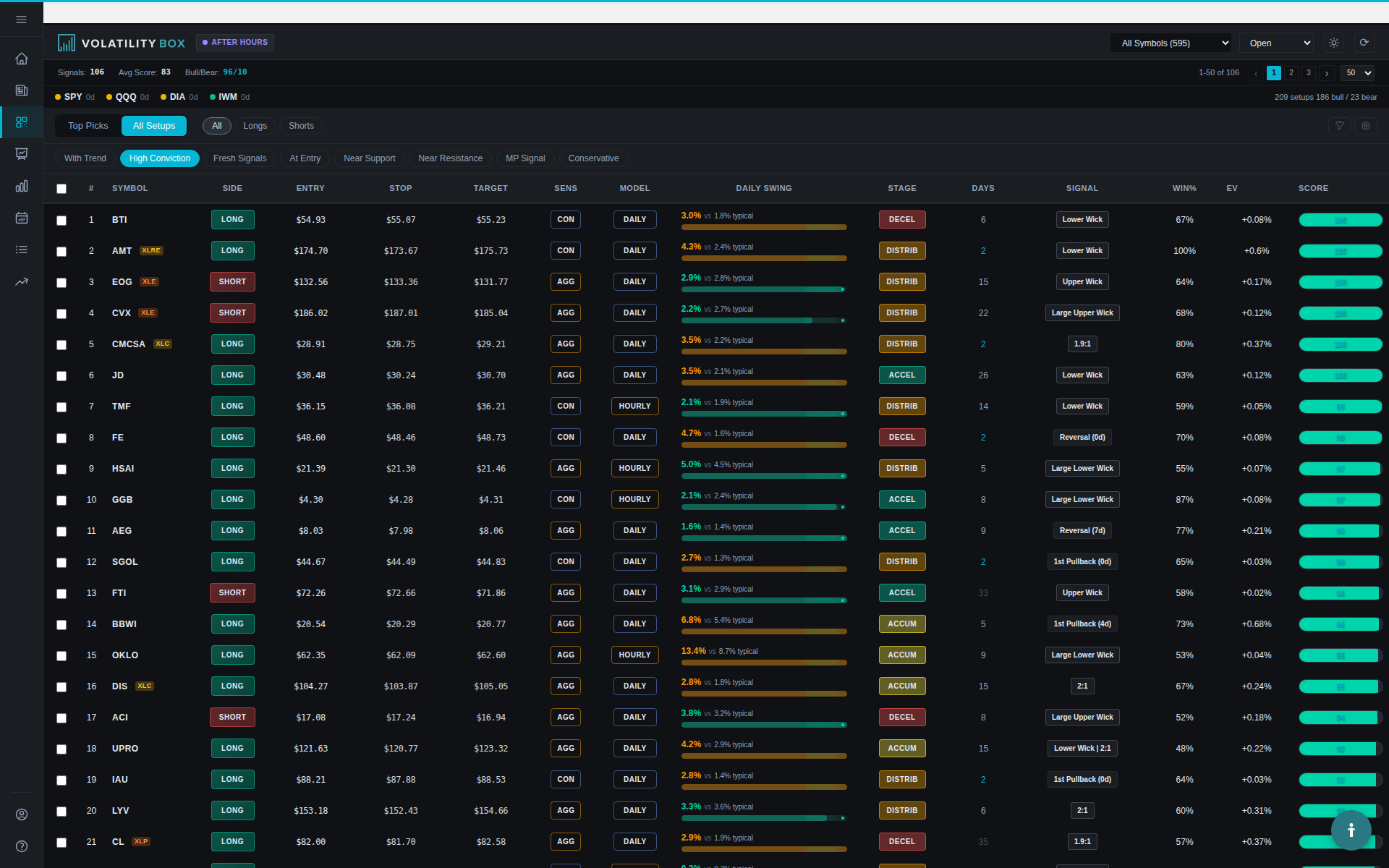
scanner results showing a high-conviction signal. capture the scanner page with a signal that has 80+ conviction score v
The Scanner displays conviction scores for each signal, helping you quickly identify high-quality setups worth further analysis.

Example: AAPL LONG signal at $180.50 with conviction 82, symbol win rate 68%, entry exactly at current price, stop $179.80 (0.39% risk), target $182.00 (0.83% potential). The risk/reward ratio calculates to 2.1:1, which is favorable.

Factor 2: Market Pulse (Trend Alignment)

Market Pulse reveals whether the signal is WITH or AGAINST the prevailing trend, which is one of the most critical determinants of success. WITH-trend setups historically show 2x higher win rates than counter-trend setups, making this a key confluence factor. Trading with the trend provides the wind at your back, while trading against it means fighting institutional money flow.

Ideal Market Pulse Confluence: The MP Alignment should show WITH (not AGAINST) for maximum probability. MP Color should be Green or Yellow for LONG signals, or Orange or Red for SHORT signals, confirming stage alignment. MP Signal Type should ideally be FP (First Pullback) or TC (Trend Continuation) rather than TR (Trend Reversal). Signal freshness matters too. Signals less than 2 hours old are more reliable, which you can verify by checking entry time in the Scanner.

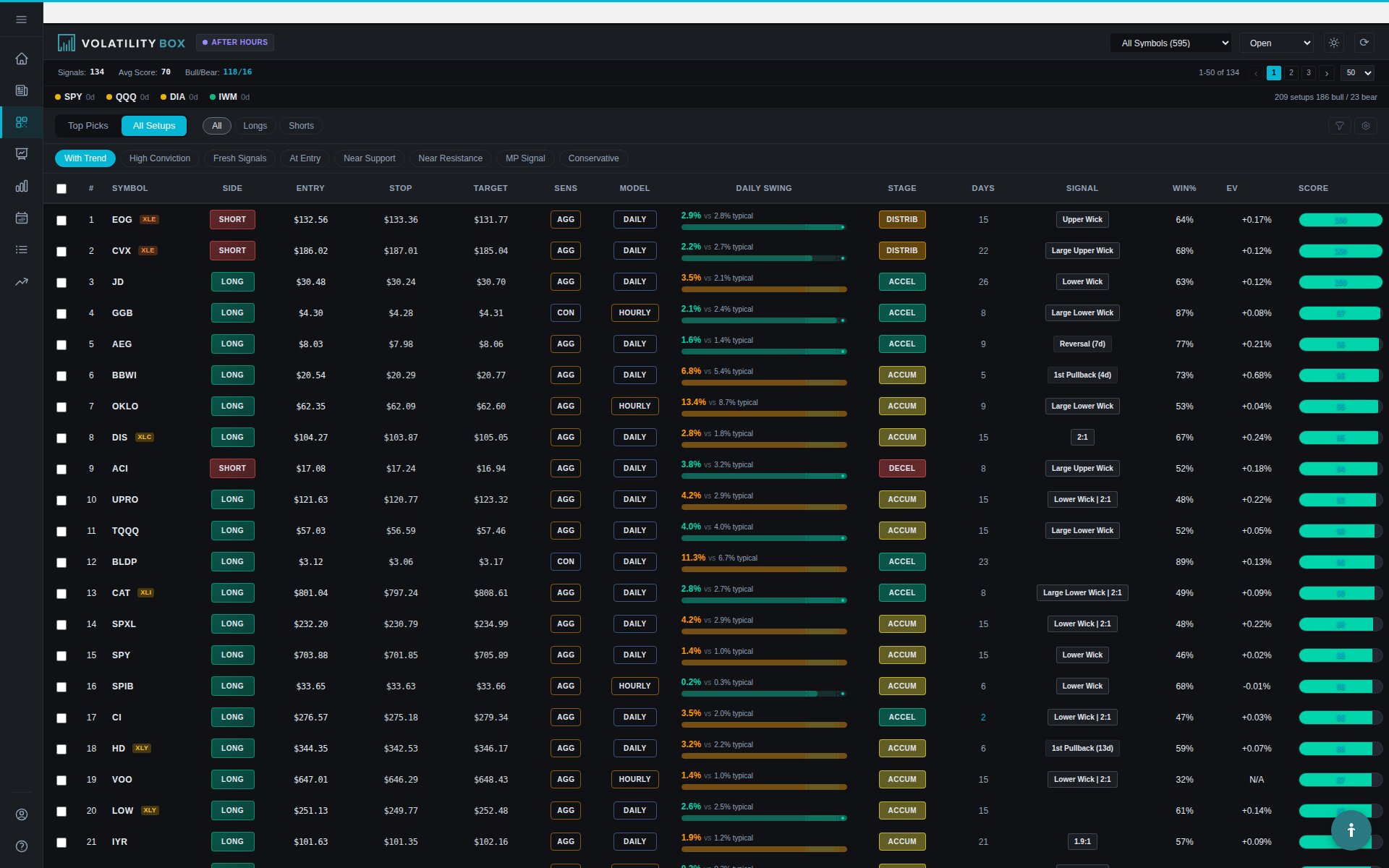
scanner filtered by mp alignment = with. capture the scanner with the market pulse columns visible, showing with alignme
Filtering for WITH alignment in the Scanner helps you focus on signals that move with the prevailing trend rather than against it.

Example: AAPL LONG with Market Pulse showing Yellow (Mark-Up stage), WITH alignment indicating trend support, FP signal type suggesting a pullback entry in an uptrend, and signal triggered just 35 minutes ago ensuring freshness.

Factor 3: Support/Resistance (Darvas Levels)

Support and resistance zones provide natural entry and exit points where price has historically reacted, making them powerful confluence factors. The best setups occur when VB entry levels align precisely with key support or resistance zones. This alignment means you’re entering where the market has institutional memory and previous price acceptance or rejection.

Support/Resistance Confluence: For LONG signals, the VB entry should align with or be very near major support levels such as moving averages or previous swing lows. There should be a clear path to the VB target with no major resistance zones blocking the way. Look for history of respect at this level. Previous bounces confirm the level’s validity. Darvas box formations can also confirm range boundaries and provide additional structure to the trade.

Example: AAPL LONG at $180.50 aligns perfectly with the daily chart showing the 20-day EMA at $180.30, which serves as proven support. Price has bounced at this EMA level 3 times in the last 2 weeks, demonstrating institutional respect for this support. The target at $182 has no resistance until $183.50, providing a clear path.

Factor 4: Volume Confirmation

Volume validates price movement and separates real moves from noise, making it an essential confluence factor. High-probability setups have volume actively supporting the trade direction, showing institutional participation. Without volume, price moves lack conviction and are more likely to fail or reverse.

Volume Confluence Criteria: Current volume should be at least 1.5x average volume, with 2x or higher being ideal for maximum confirmation. Volume should be increasing on the approach to VB entry level, showing acceleration of interest. Look for volume spikes on reversal candles, which indicate exhaustion plus reversal confirmation. Also watch for volume divergence patterns. Price making new lows on decreasing volume is actually a bullish divergence signal.

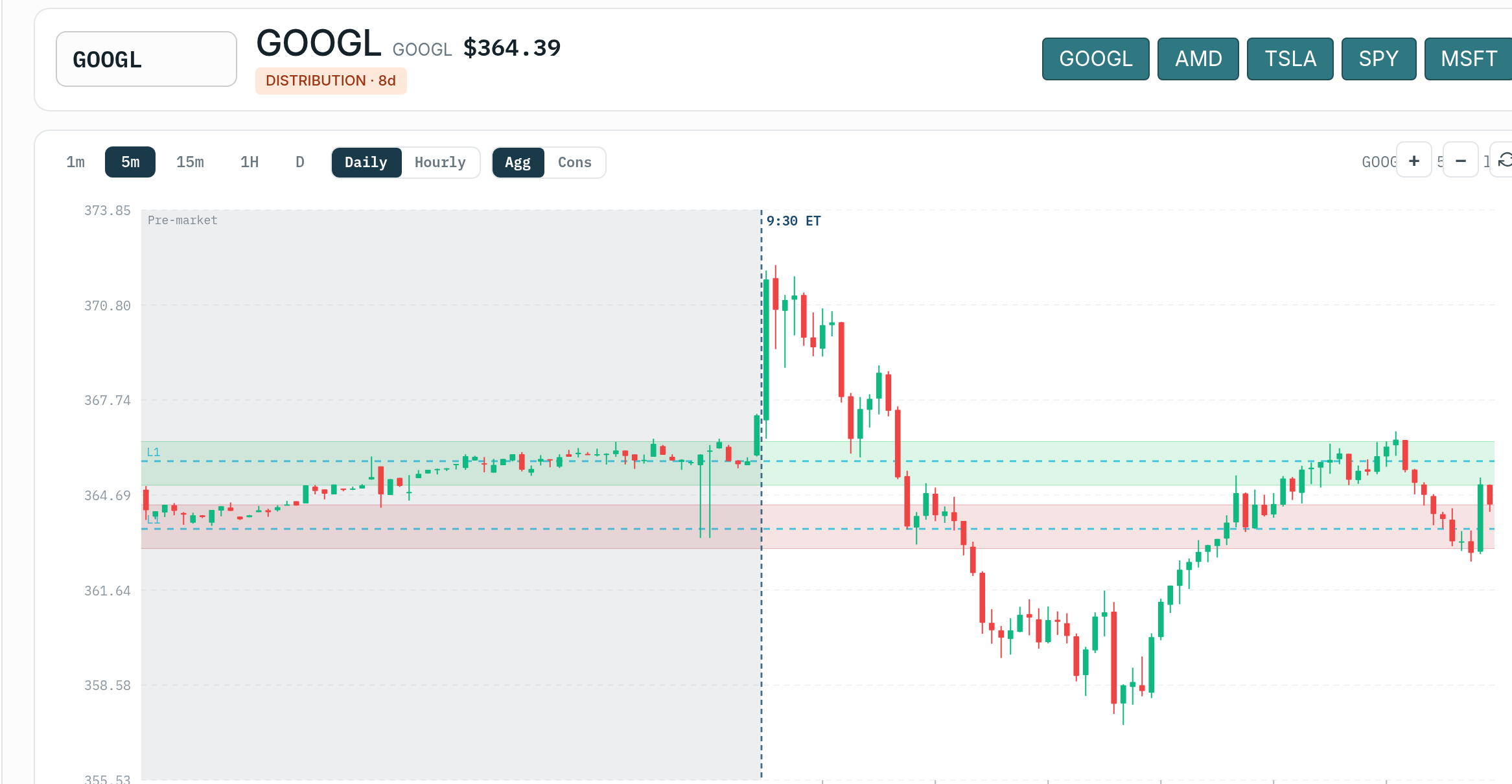
symbol page chart showing volume bars. capture a symbol page with the price chart and volume indicator visible. annotate
The Symbol Page chart displays volume bars beneath price action, allowing you to confirm whether institutional participation supports the signal.

Example: AAPL average daily volume is 55M shares. By 2:00 PM, volume has reached 48M shares, which is 1.8x the average pace and indicates strong participation. The last 3 hourly candles show increasing volume as price approached the $180.50 entry level, confirming accumulation.

Factor 5: Candle Patterns (Technical Confirmation)

Candle patterns provide micro-level confirmation of reversals or continuations, offering visual evidence of supply and demand dynamics. These patterns reveal the psychology of market participants at key price levels. Strong candle patterns at VB entry levels significantly increase the probability that the level will hold.

Bullish Candle Patterns (LONG signals): Hammer candles show long lower wicks with small bodies, demonstrating rejection of lower prices and buyer interest. Bullish Engulfing patterns occur when a green candle completely engulfs the previous red candle, showing momentum shift. Morning Star is a three-candle reversal pattern appearing at lows. Piercing Patterns show a green candle closing above the midpoint of the previous red candle, indicating buyer strength.

Bearish Candle Patterns (SHORT signals): Shooting Star candles display long upper wicks with small bodies, showing rejection of higher prices and seller interest. Bearish Engulfing happens when a red candle engulfs the previous green candle, indicating momentum reversal. Evening Star is a three-candle reversal pattern appearing at highs. Dark Cloud Cover shows a red candle closing below the midpoint of the previous green candle, demonstrating seller dominance.

Example: AAPL forms a textbook hammer candle on the hourly chart precisely at the $180.50 entry level. The lower wick measures 0.50% while the body is only 0.10%, showing strong rejection of lower prices. The next candle opens higher with increasing volume, confirming the reversal.

Confluence Scoring System

Using this objective scoring system removes emotion from your trade evaluation process and ensures consistency. Each factor can contribute 1-3 points depending on the strength of the criteria met. This numerical approach makes it easy to compare different setups and prioritize your best opportunities.

Confluence Score Table

Factor Criteria Met Points
VB Signal Conviction 75-79 +1
Conviction 80-89 +2
Conviction 90+ +3
Market Pulse WITH alignment only +1
WITH + FP/TC signal +2
WITH + FP/TC + Green/Yellow +3
Support/Resistance VB entry near S/R +1
+ Clear path to target +2
+ Previous bounces confirmed +3
Volume 1.5x average +1
2x average +2
2x average + increasing +3
Candle Pattern Weak pattern present +1
Strong pattern (hammer, engulfing) +2
Multi-candle confirmation +3

Score Interpretation

These score ranges provide clear guidelines for position sizing and trade selection decisions. Higher scores justify larger positions and more aggressive entries. Use these thresholds consistently to build a repeatable, systematic trading approach.

  • 10-15 points: Exceptional confluence, max position size (2-3% risk)
  • 7-9 points: Strong confluence, standard position size (1-2% risk)
  • 4-6 points: Moderate confluence, reduced size (0.5-1% risk)
  • Below 4 points: Weak confluence, skip the trade

Real-World Confluence Examples

Example 1: 5-Factor LONG Setup (Score: 13)

Symbol: MSFT
Date: January 18, 2025, 10:15 AM

Factor Details Points
VB Signal LONG at $385.50, Conv 84, Win rate 72% +2
Market Pulse WITH, FP signal, Yellow (Mark-Up) +3
Support/Resistance Entry at 50-day SMA ($385.40), clear to $390, bounced here 4x +3
Volume 2.3x average, increasing last 3 candles +3
Candle Pattern Bullish engulfing + hammer on previous candle +2
Total 13

Trade Result: Entered LONG at $385.50 with high conviction based on exceptional confluence score. The trade hit target $388.80 in just 2 days for a +0.86% gain, demonstrating how high-quality setups tend to work quickly. This represents a clean win with minimal drawdown during the hold period.

Example 2: 2-Factor Setup (Score: 2) – Skip

Symbol: TSLA
Date: January 16, 2025, 2:45 PM

Factor Details Points
VB Signal SHORT at $242.80, Conv 72, Win rate 38% +1
Market Pulse AGAINST (signal SHORT, trend is WITH LONG) 0
Support/Resistance No clear S/R at entry, choppy zone 0
Volume 0.8x average (low volume) 0
Candle Pattern Doji (indecision) +1
Total 2

Decision: Skip this trade entirely despite the VB signal presence. With only 2 total factors and an AGAINST trend alignment, the probability of success is very low. The poor symbol win rate of 38% and low volume further confirm this is a low-quality setup that doesn’t meet our minimum standards.

Finding Confluence Setups in the Scanner

The key to finding high-confluence setups is using a systematic filtering approach that narrows down the universe of signals to only the best candidates. This filter recipe ensures you’re starting with quality signals before doing deeper analysis. Following this process daily will create a consistent pipeline of high-probability trades.

Scanner Filter Recipe

scanner filter panel with confluence filters applied. capture the scanner page showing the filter dropdown or filter pan
Apply these Scanner filters to quickly narrow down to signals that already meet several confluence criteria before you begin manual analysis.
  1. Conviction: 75+ (gets you Factor 1)
  2. MP Alignment: WITH (gets you Factor 2)
  3. MP Signal Type: FP or TC (trend continuation)
  4. Win Rate: 50%+ (filters for symbols that respect VB)
  5. Volume: Manually check on Symbol Page (Factor 4)
  6. S/R + Candles: Check Symbol Page charts (Factors 3 & 5)

This filter typically leaves you with 5-15 high-quality candidates from the full universe of signals. Open Symbol Pages for each remaining candidate and score them using the confluence table shown earlier. Finally, trade only the top 2-3 highest-scoring setups rather than spreading yourself thin across many positions.

Bonus Confluence Factors

Beyond the core 5 factors, these additional elements can increase probability even further when present. Consider these as tiebreakers when comparing multiple setups with similar scores. While not required, their presence can transform a good setup into an exceptional one.

Bonus Factor: Short Interest

If you have a LONG signal AND short interest exceeds 15%, there’s potential for a short squeeze that could accelerate the move. Check the Short Interest Scanner for the symbol’s SI% and Days to Cover metrics. Bonus points apply if SI exceeds 20% and DTC is greater than 5 days, creating real squeeze potential.

Bonus Factor: Sector Strength

Check whether the symbol’s sector is outperforming or underperforming SPY, as sector momentum often drives individual stock performance. LONG signals in strong, outperforming sectors have measurably higher win rates than those in weak sectors. Similarly, SHORT signals in weak, underperforming sectors have higher win rates than those in strong sectors.

Bonus Factor: Time of Day

Signals that appear at optimal times, such as the opening bell or power hour, typically perform better than mid-day signals. Avoid taking signals during the lunch hour period (11 AM – 2 PM) unless the conviction is very high. Market participation and volume patterns vary significantly by time of day.

Bonus Factor: Recent Earnings

If earnings beat expectations and guidance was raised, a LONG signal has strong fundamental confluence supporting it. If earnings missed and guidance was lowered, a SHORT signal has strong fundamental support. Always check the earnings calendar before trading to ensure you’re not walking into an earnings announcement that could invalidate your technical setup.

Confluence vs Conviction Score

You might wonder whether confluence analysis is redundant since the conviction score already factors in multiple variables. While there is some overlap, they serve different and complementary purposes in your analysis. Understanding the distinction helps you use both tools effectively.

Aspect Conviction Score Confluence Analysis
Source Platform calculates automatically You evaluate manually
Factors VB performance, momentum, Market Pulse, S/R, R/R VB + MP + S/R + Volume + Candles + Bonuses
Customization Fixed algorithm Your preferences (e.g., you value volume more)
Real-time Elements May lag real-time price action Live chart analysis captures current moment

Best Approach: Use the conviction score as your first filter to identify signals scoring 75+, then manually verify confluence for the top candidates that pass that initial screen. This approach combines the platform’s computational intelligence with your human chart-reading skills and real-time market awareness. Together, they create a more complete analysis than either could provide alone.

Common Confluence Mistakes

Being aware of common mistakes helps you avoid them and maintain objectivity in your analysis. These errors typically stem from confirmation bias or impatience to enter trades. Recognizing these patterns in your own decision-making is essential for improvement.

  • Forcing confluence: Seeing factors that aren’t really there (“I guess that’s kinda like a hammer candle…”)
  • Ignoring missing factors: “It has 3 factors, that’s enough” when 2 major factors are clearly against you
  • Over-complicating: Waiting for 10 factors to align (you’ll never trade). 3-5 is the sweet spot
  • Skipping confluence on high conviction: “Conviction is 92, I don’t need to check anything else” – still verify

Summary: Confluence Analysis Workflow

  1. Filter Scanner for Conviction 75+, MP Alignment WITH
  2. Open Symbol Page for top 10-15 candidates
  3. Score each setup using 5-factor confluence table
  4. Add bonus factors (short interest, sector, time of day)
  5. Rank setups by total score
  6. Trade top 2-3 setups with scores 7+
  7. Skip any setup with score below 4
  8. Adjust position size based on score (10+ = max size, 4-6 = half size)

Confluence analysis transforms you from a reactive signal-chaser into a selective, high-probability trader who only takes the best setups. It takes an additional 2-3 minutes per trade to perform this analysis, but the result is a 15-20 percentage point increase in your win rate. That’s a trade-off worth making every single time, as those extra percentage points are the difference between consistent profitability and mediocre results.

Was this article helpful?

Still need help?

Can't find what you're looking for? Our support team is here to help.

Contact Support