Watchlist Bulk Generation
Why Bulk Generation Saves Time
Generating Volatility Box studies one symbol at a time is tedious and time-consuming, especially when you’re managing a portfolio of multiple stocks. If you maintain a 20-symbol watchlist, that translates to 80 individual files you must download manually. Each symbol requires all 4 study variations: Hourly Aggressive, Hourly Conservative, Daily Aggressive, and Daily Conservative.
Watchlist-based bulk generation solves this problem by creating all 80 files in a single click. This saves hours of repetitive work every week and ensures you never miss updating an important symbol before the trading week begins.
Pre-Generated Bundle: 115 Liquid Tickers
Every Sunday at 12 PM Pacific Time, the VB platform automatically generates studies for 115 highly liquid tickers that cover the vast majority of active trading opportunities. This pre-generated bundle includes all 100 stocks in the S&P 100 index plus the top 15 most actively traded stocks outside the S&P 100, including popular ETFs like SPY, QQQ, IWM, and DIA.

The pre-generated bundle contains 460 total study files (115 symbols x 4 study types per symbol) ready for immediate download. You don’t need to wait for generation or select symbols individually. Click Download Pre-Generated Bundle and you’ll receive all 460 studies in a single .zip file.
This one-click approach is the fastest way to get Volatility Box studies for the most popular symbols and covers approximately 95% of tradeable VB signals across the market.
To access the pre-generated bundle:
- Navigate to the Indicator Generator page
- Look for the Download Pre-Generated Bundle button
- Click to download the .zip file
- Extract all 460 .ts study files to your computer for bulk import into ThinkorSwim
Creating Focused Watchlists
If you trade symbols outside the 115 pre-generated tickers, or if you want to focus on a smaller subset of stocks, you can create custom watchlists for bulk generation.
Before using bulk generation, you need to create a focused watchlist that balances trading opportunity with practical manageability. The recommended range is 10-20 symbols. This size provides enough diverse trading opportunities throughout the week without overwhelming your ability to monitor setups during live market hours.

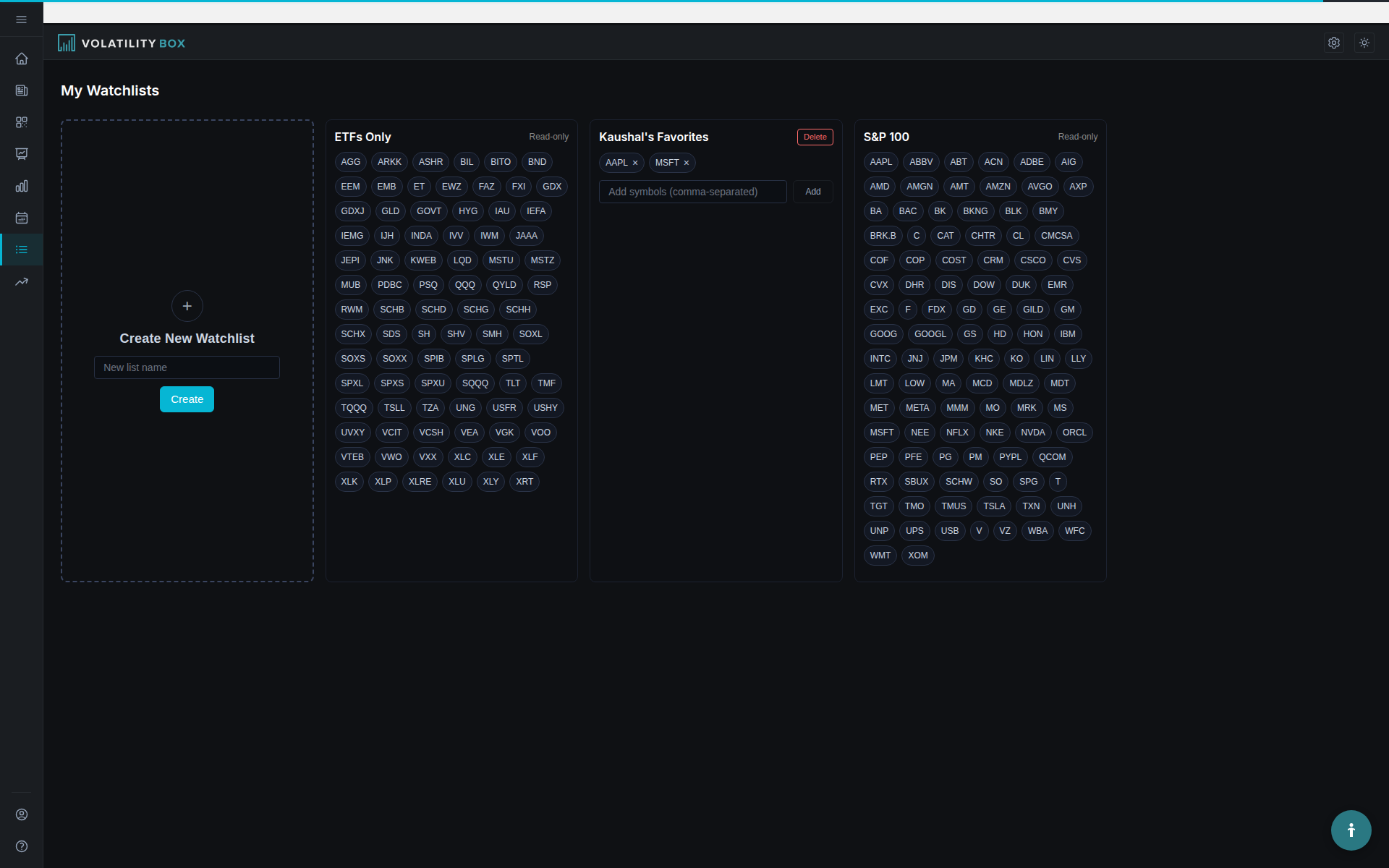
To create a new watchlist within the platform:
- Navigate to the Watchlists section in the sidebar
- Click the Create New Watchlist button
- Name your watchlist according to your strategy or market focus (examples: “Tech Momentum,” “Mega-Caps,” or “High Beta”)
- Add symbols by typing them individually or pasting a comma-separated list of tickers
- Click Save to finalize your watchlist
This organizational step ensures your studies are generated in logical groupings that match your actual trading workflow.
Example Watchlists by Trading Style
Tech Momentum (15 symbols): AAPL, MSFT, NVDA, GOOGL, META, TSLA, AMD, NFLX, CRM, ADBE, INTC, QCOM, AVGO, MU, ORCL. Focused on high-growth technology companies with strong momentum characteristics.
Mega-Caps Only (10 symbols): AAPL, MSFT, NVDA, GOOGL, AMZN, META, TSLA, BRK.B, JPM, V. Concentrates on the largest, most liquid names for stability and consistent trading opportunities.
High Beta Movers (12 symbols): TSLA, NVDA, AMD, PLTR, COIN, RIVN, LCID, MARA, RIOT, SQ, ARKK, SHOP. Targets volatile stocks with significant daily price swings, ideal for scalping and aggressive day trading.
One-Click Generation Process
Once your watchlist is created and saved, generating all required studies becomes a simple one-click operation.
Select your watchlist from the dropdown menu and click Generate Studies for Watchlist to create all studies at once.
To generate studies for your watchlist:
- Navigate to the Indicator Generator page
- Select your target watchlist from the dropdown menu (e.g., “Tech Momentum”)
- Click the Generate Studies for Watchlist button
- Wait approximately 10-20 seconds while the progress bar displays generation status
- Click Download All to receive a compressed .zip file containing all studies
The downloaded .zip file contains 60 individual study files for a 15-symbol watchlist, organized systematically by symbol and model type. Each symbol receives exactly four distinct study files:
- VBH Aggressive: Hourly timeframe using aggressive band settings
- VBH Conservative: Hourly timeframe using conservative band settings
- VBD Aggressive: Daily timeframe using aggressive bands
- VBD Conservative: Daily timeframe using conservative bands
All generated studies are valid for the current trading week, which runs from Sunday at 12 PM Pacific Time through the following Sunday.
TOS File Format and Import
All Volatility Box studies are generated as .ts ThinkScript files that are natively compatible with the ThinkorSwim platform. ThinkScript is ThinkorSwim’s proprietary scripting language for custom studies and indicators, and the .ts file format is recognized automatically during import.
After downloading your watchlist studies:
- Unzip the .zip file to a clearly labeled folder (e.g., VB_Tech_Momentum_2025-01-20)
- Open ThinkorSwim desktop
- Navigate to Charts, then Studies, then Edit Studies, then Import
- Navigate to your unzipped folder
- Select all .ts files at once using Ctrl+A (Windows) or Cmd+A (Mac)
- Click Open to begin the bulk import process
ThinkorSwim will import all selected studies simultaneously and display a confirmation message showing how many studies were successfully imported. The bulk import feature handles hundreds of files at once, so you can import your entire watchlist or the full 460-file pre-generated bundle in a single operation.
VB Cloud Visualization on Charts
After importing your studies and applying them to ThinkorSwim charts, you’ll see the complete Volatility Box visualization:
The VB cloud visualization on a ThinkorSwim chart shows entry bands, volatility zones, stops, and profit targets at a glance.
- Upper Band (Green Line): Entry level for LONG positions when price breaches below and bounces back
- Lower Band (Red Line): Entry level for SHORT positions when price breaches above and reverses down
- VB Cloud Zone (Shaded Area): The area between upper and lower bands showing the expected volatility range. Wider clouds indicate higher volatility; narrower clouds indicate lower volatility.
- Stop Lines (Orange Dashed): Risk management stop levels for each position type
- Target Lines (Cyan): Profit target levels based on statistical projections
- Dynamic Labels: Current price levels for each band displayed in the upper corner of the chart
The VB cloud visualization makes it immediately obvious when price is approaching a breach level, where your stops should be placed, and what your profit targets are. The cloud zone width also gives you instant visual feedback on current volatility conditions for that symbol.
Generate All Feature
If you maintain multiple watchlists representing different strategies or market segments, the Generate All feature allows you to create studies for every watchlist simultaneously in one batch operation.
The Generate All Watchlists button at the bottom of the Indicator Generator page creates studies for all your watchlists in one operation.
To use the Generate All feature:
- Navigate to the Indicator Generator page
- Scroll down to find the Generate All Watchlists button
- Click this button and wait approximately 30-60 seconds depending on your total symbol count
- Click Download All to receive a single .zip file containing studies for all your watchlists
For example, if you maintain 3 separate watchlists containing 15, 20, and 10 symbols respectively, you’ll receive 180 individual study files in total (45 unique symbols x 4 study variations per symbol).
The Generate All feature is particularly valuable on Sunday evenings as part of your weekly market preparation routine. It ensures all your watchlists have freshly generated studies ready for Monday’s market open.
Auto-Download Settings
Enable the auto-download preference to skip the manual download step entirely. Your .zip file will download automatically to your computer as soon as the generation process completes.
To enable auto-download:
- Navigate to Settings in the main menu
- Click Preferences
- Locate the Indicator Generator section
- Check the box labeled “Auto-download after generation”
- Click Save Preferences
From that point forward, whenever you click Generate Studies for Watchlist or Generate All, the resulting .zip file will download automatically to your default downloads folder without requiring you to manually click Download All.
Weekly Rotation Process
Review and rotate your watchlist symbols on a monthly basis to ensure you’re consistently trading stocks that work best with your strategy while removing persistent underperformers.
On the first Sunday of each month:
- Pull up your detailed trading journal
- Identify symbols that consistently win (keep or increase focus)
- Identify symbols that consistently lose (remove immediately)
- Check the Scanner for newly emerging high-performers that might deserve addition
This systematic monthly review keeps your watchlist dynamically aligned with current market conditions rather than relying on stocks that worked well six months ago but no longer fit the current volatility regime.
Symbol Validation
The Volatility Box platform automatically validates all symbols you enter against the 595 officially supported tickers. This ensures you’re only generating studies for stocks that have complete VB data available and properly calculated bands.
When creating or editing any watchlist, the platform provides immediate visual feedback:
- Green: Valid supported symbols that are ready for study generation
- Red: Invalid or unsupported symbols with a clear error message explaining the issue
The supported universe includes all 500 S&P 500 component stocks plus 95 additional highly liquid names that meet strict minimum volume and market capitalization requirements for data quality and trading viability.
Key Takeaways
- Pre-generated bundle includes 115 highly liquid tickers (S&P 100 + top 15 active stocks) auto-generated every Sunday at 12 PM PT
- Download 460 pre-generated studies in one click for instant access to the most popular symbols
- Create custom watchlists of 10-20 symbols for focused trading and bulk generation
- One-click watchlist generation creates all 4 study types for all symbols simultaneously
- All studies use .ts ThinkScript file format compatible with ThinkorSwim bulk import
- VB cloud visualization on charts shows entry bands, volatility zones, stops, and targets
- Generate All feature creates studies for all your watchlists in one batch operation
- Review and rotate watchlist symbols monthly to stay aligned with current market conditions
Next step: Read “Install TOS Studies” to learn how to bulk import your watchlist studies into ThinkorSwim and apply them to your charts.
Was this article helpful?
Still need help?
Can't find what you're looking for? Our support team is here to help.
Contact Support